List of Spool Requests
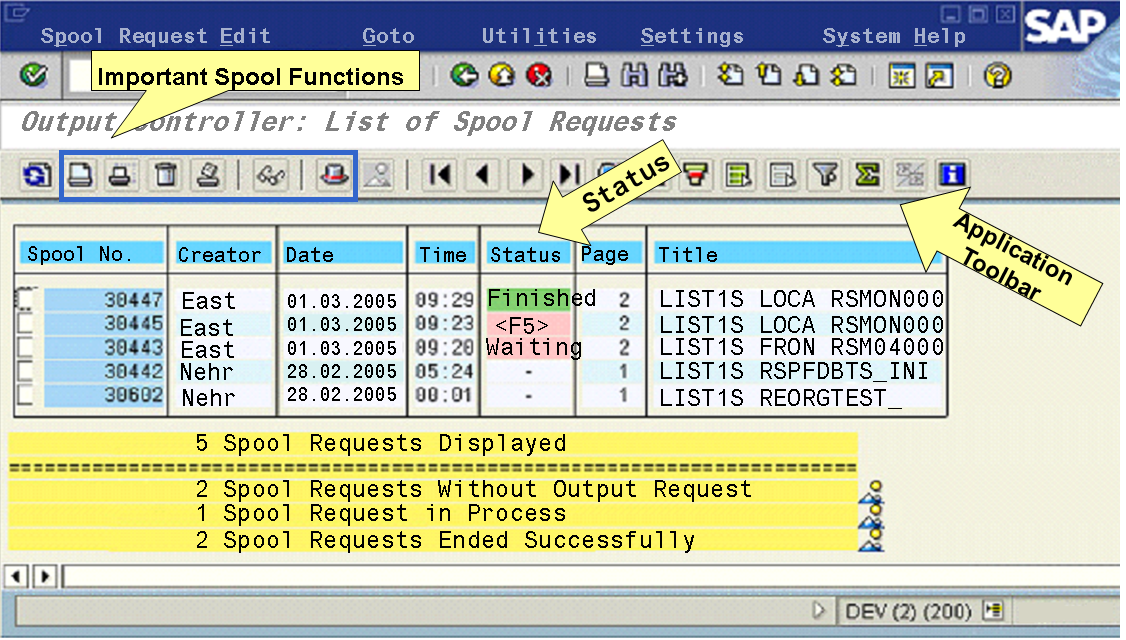
The list of spool requests is a list of the spool requests that match the selection criteria that you specified in the initial screen of transaction SP01 (Output Controller) (see also Selecting Spool and Output Requests).
Information, such as spool number, creation date and time, creator, number of pages, and the processing status is displayed for each request. The data for a spool request is displayed in a row.
The following figure shows a list of spool requests:
You can tailor this list according to your needs. You can make the following settings, for example by choosing  Settings
  Layout Current
  :
:
Showing and Hiding Columns
Create variants
You can edit the displayed spool requests. To do this, you must select the spool requests and then choose the desired function in the application toolbar.
The following functions are available to edit the displayed spool requests:
-
An output request is generated for the spool request. The print settings of the spool request are used.
NoteThis function is available in the application toolbar and should not be confused with the general print function in the system toolbar.

Change the print settings, such as the printer name, before you print the spool request.
 Display and Change Spool Request Information (such as number of pages or output device)


Choose
Goto Display Requests Settings from the list of spool requests. By default, only the first 10 pages of a spool request are displayed. You can display the number of pages in the Display Area group box.

If you want to see the output requests for a spool request, double-click the status of the corresponding spool request in the list of spool requests.
If you want to see the output requests for multiple spool requests, select the spool requests and choose
.
