Suspend and Resume Calls
Suspend and resume calls in a Web Dynpro ABAP application are useful if you want to navigate to a second independently-running application without closing the first application . To implement a suspend and resume call, you can select any outbound or inbound plugs from the interface view of a Web Dynpro window to use as suspend or resume plugs. A suspend plug call is similar to an exit plug call in as much as both plugs are used to exit an active Web Dynpro ABAP application. However, in contrast to an Exit Plug a suspend plug enables you to return to the original application after you have used a second, stand-alone application. The original application is not closed as it would be if an exit plug is called, it is simply suspended and reactivated by a resume plug.
You can define a suspend call in a Web Dynpro ABAP application to call the following targets:
-
Another Web Dynpro application
-
A Web application created with a different technology (e.g. BSP)
Since suspend and resume plugs are used for communication from the active component, they have to be added to the interface view of the Window.
Each suspend plug has the URL parameter, which is obligatory here, in contrast to the exit plug, where the parameter is optional. When a suspend plug is called, a target URL must be specified.
If you have created at least one suspend plug for an interface view, one resume plug must also be created here. Without a resume plug it is not possible to reactivate a suspended application. Only one resume plug can be defined for each Web Dynpro window.
Be aware of the security issues relating to suspend and resume calls. For more information, see Data Security in Web Applications and Permissibility of Database Changes with Start and Resume .
Suspend Call to a Web Dynpro ABAP Application
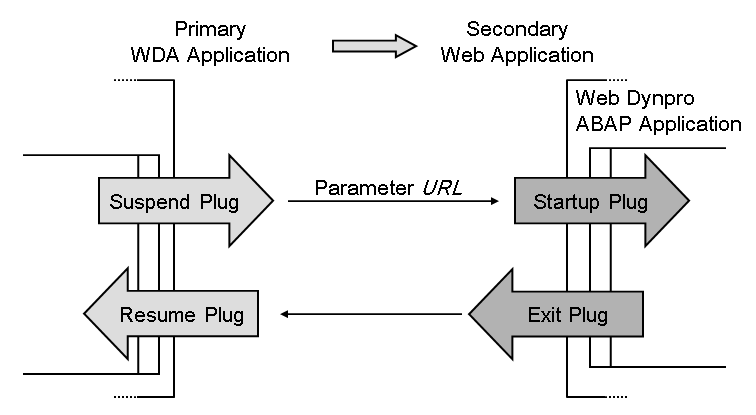
It is straightforward to set up a suspend call: First select an outbound plug as the suspend plug in the primary Web Dynpro ABAP application. Call the plug, and as the value for the URL parameter specify a string that represents the URL of the target application (see source code example below).
method ONACTIONGO_SUSPENDING .
data: L_REF_MAIN_WINDOW type ref to IG_MAIN_WINDOW .
L_REF_MAIN_WINDOW =   WD_THIS->GET_MAIN_WINDOW_CTR( ).
  L_REF_MAIN_WINDOW->FIRE_GO_SUSPENDING_PLG(
    URL =   'http://…………/webdynpro/sap/my_secondary_wda'  ).

endmethod..
The URL of a Web Dynpro application is defined as one of its properties on the relevant tab of the application in the Web Dynpro Explorer. You can copy it from here.
When an exit plug is fired in the secondary Web Dynpro ABAP application, this application is closed and the resume plug of the primary application is called automatically . Within the Web Dynpro framework a reference to the active instance of the primary application is transferred in the suspend call. The secondary application knows its status as the subsequent application of a suspended primary application, and when an exit plug is called, and returns to the resume plug of the primary application when an exit plug is called using the specified reference.
In this case no further programming steps are necessary.
Suspend Call to a Non-Web Dynpro ABAP Application
It is more complex to set up a suspend call to a non-Web Dynpro ABAP application since the secondary application needs to be adapted. For example, in the secondary application you have to implement the mechanism to return to the primary application. As well as specifying the address of the secondary application in the obligatory URL parameter, you also have to specify the URL of your own application for the subsequent return step. This resume URL is also transferred as the URL parameter to the secondary application.
The resume URL must be read In the secondary application. A redirect to the resume URL is then opened in the browser window of the secondary application.
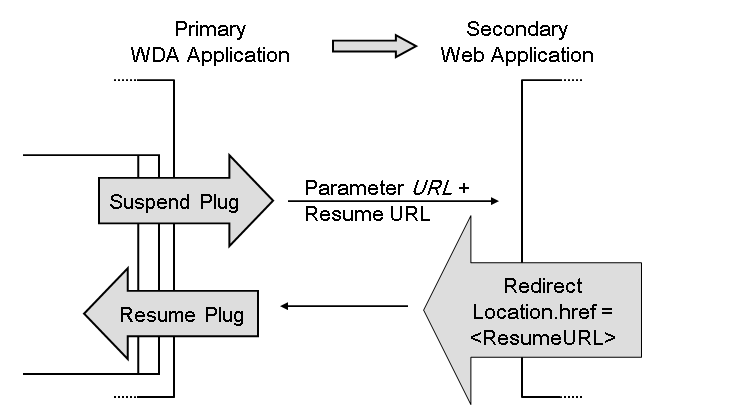
With this URL the primary application is called using its resume plug and reactivated.
Suspend and resume plugs can have user-defined parameters. For more information, see Window: Inbound and Outbound Plug Parameters
Suspend and resume calls are not released for use in a portal environment.