Creating and Configuring Web Service Consumers
Context
When you consume services using the Integration Server (IS) as a broker between the provider and the consumer side, the communication flow goes through different stages. To invoke a Web service method on the provider side, the consumer application has to send a relevant message request to the IS. Initially this request is a SOAP message; however, the Web service runtime and the Java Proxy Runtime (JPR) convert this message to an XI-specific one and thus make it comprehensible to the IS. Subsequently, the JPR sends this XI message to the IS, and then the server sends it in turn to the provider side. The role of the IS is to establish proper communication with any service provider. For example, service providers can be Web services, JMS Providers, RFC calls, or others.
The figure below describes the different stages of the communication flow from the request of the consumer application to the IS.
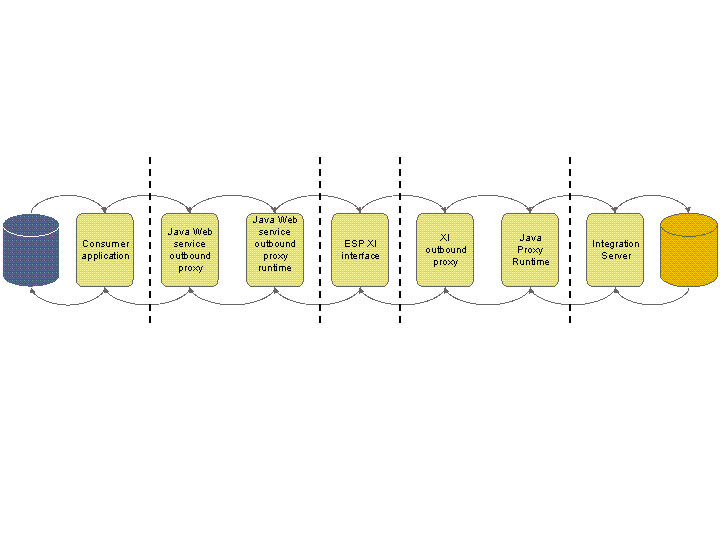
Each XI message comprises SOAP XML payload (serialized content of the operation and its parameter values), attachments, and specific XI data. The runtime uses SAP-specific application program interfaces to create the attachments and to configure the specific XI data.
Procedure
-
Create a Web service consumer (outbound proxy) for brokered communication. In this case, the IS can be viewed as a service provider.
More information:
-
Create a synchronous or an asynchronous Java Web service consumer for brokered communication.
-
To enable XI 3.0 communication with the IS, extend the outbound proxy capabilities by using the application program interfaces for outbound proxy communication.
Application Program Interfaces for Outbound Proxy Communication
-
-
Configure the outbound proxy.
More information:
-
Configure the synchronous or asynchronous Java Web service consumer for brokered communication.
Configuring Web Service Consumers for Brokered Communication
-