Scheduling Jobs with Cron Start Conditions
This section outlines the attributes of the CronEntry class.
Cron Entries
In the SAP NetWeaver Scheduler for Java, CronEntry instances provide functionality similar to that of the crontab command in Unix.
The CronEntry class specifies several attributes outlined in the table below.
CronEntry Attributes
|
Attribute |
CronField Class Counterpart |
Meaning |
|---|---|---|
|
Year |
CronYearField |
The year in which you want the job to run |
|
Month |
CronMonthField |
The month in which you want the job to run |
|
Day of Month |
CronDOMField |
The day of month in which you want the job to run |
|
Day of Week |
CronDOWField |
The day of week in which you want the job to run |
|
Hour |
CronHourField |
The hour in which you want the job to run |
|
Minute |
CronMinuteField |
The minute in which you want the job to run |
You use the CronEntry attributes to specify the date and time and how often you want an instance of a job definition to run relative to the start of the month, week, day, and hour.
Additionally, a CronEntry has a TimeZone. All the processing is done with respect to this specified TimeZone. If you do not specify a TimeZone, the default TimeZone of the local machine is used.
Regarding the representation of the attributes that you instantiate in a CronEntry , the Scheduler API offers two sets of CronEntry constructors:
With the two constructors from the snippets below, you pass the fields of the CronEntry class as string.
//Takes the time zone from the local machine
CronEntry(String cron_entry)

//Takes a specified time zone
CronEntry(String cron_entry, TimeZone tz)
With the two constructors from the snippets below, you pass the class attributes as instances of the CronField classes.
//Takes the time zone from the local machine
CronEntry(CronYearField years, CronMonthField months, CronDOMField dom, CronDOWField dow, CronHourField hours, CronMinuteField minutes)

//Takes a specified time zone
CronEntry(CronYearField years, CronMonthField months, CronDOMField dom, CronDOWField dow, CronHourField hours, CronMinuteField minutes, TimeZone tz)
Each CronField instance can be constructed as a string.
Rules for the CronEntry Fields String Representation
Fields Order
In the string representation that you pass to a CronEntry , every field has a fixed position: the string for Year comes first, followed by that for Month , Day of month , Day of week , Hour , and Minute , as the figure below shows.
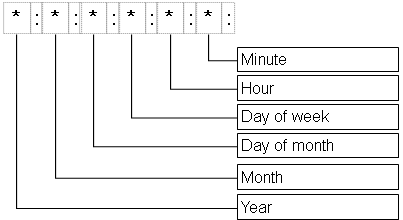
The fields are separated by colon (:).
Make sure you do not leave spaces before or after the field values.
Filed Ranges
Every field has a possible range of the values it can take, as specified in the table below:
CronEntry Field Value Range
|
Field |
Possible Value |
|---|---|
|
Year |
2006 - infinity |
|
Month |
0 - 11. 0 stands for January. |
|
Day of month |
1 - 31 |
|
Day of week |
1 - 7. 1 stands for Sunday, 2 - for Monday, and so on. |
|
Hour |
0 - 23 |
|
Minute |
0 - 59 |
For example, the CronEntry from the snippet below will run on the 3rd of January and every Sunday in January at 1:15 AM in 2007. The entry will run in the current time zone of the local machine. In our example below, the TimeZone of the local machine is Eastern European Time (EET). Each CronEntry has its own TimeZone. The Cron conditions are evaluated with respect to the time representation in the corresponding TimeZone. They do not depend on the time zone of the machine the server is running on.
Be aware that this is a rather powerful feature. You can schedule a daily job at 5 p.m. Eastern Time on a server that runs in some European time zone. You do not need to care about diffent daylight saving rules of these time zones. For more information about the special behavior of CronEntry at Daylight saving time (DST) and time changeover, see Server Downtime, Daylight Saving Time, and Time Shift .
The exact execution times are shown in below the CronEntry.
|
CronEntry myEntry = new CronEntry ("2007:0:3:1:1:15") Execution times: Wed Jan 03 01:15:00 EET 2007 Sun Jan 07 01:15:00 EET 2007 Sun Jan 14 01:15:00 EET 2007 Sun Jan 21 01:15:00 EET 2007 Sun Jan 28 01:15:00 EET 2007 |
Operators
There are several ways to specify multiple values for fields as listed below:
-
Asterisk (*)
This value means "from first to last", "every". Every field can take this value. For example, the string (*:*:*:*:*:*) means every minute of every hour every day into infinity.
-
Comma (,)
By using a comma, you specify a list of values for a field. For example, the value 7,1 for the Day of week field means every Saturday and every Sunday.
-
Dash (-)
By using a dash, you specify a range of values for a field. For example, the value 3-7 for the Day of month field means from the 3rd to the 7th of the month, that is on days 3, 4, 5, 6, and 7 of the month.
You can combine the use of comma and dash to specify a list of ranges for a field. For example, the value 0-2,6-8 (without whitespace) for the Month field means January, February, March and July, August, September.
-
Slash (/)
Using the slash has two different meanings depending on whether it is used in combination with a * or with a range (e.g. 7-17)
-
*/z means: Every possible value that is divisible by z.
E.g. for the Day field, */3 means 3, 6, 9, …, 30.
For the Hour field, */3 means 0, 3, 6, …, 21.
For the Month field, */3 means January, April, July, October.
The value */15 for the Minute field means every quarter of an hour, starting from 0, that is 0, 15, 30, 45 within one hour.
-
x-y/z means every z from x to y.
E.g. for the Day field, 1-31/3 means 1, 4, 7, …, 28, 31. (Note that this is completely different from */3).
For the Hour field, 0-23/3 means 0, 3, 6, 9, …, 21. (Note that this is the same as */3.)
In the Hour field, */2 are the even hours, whereas 1-23/2 are the odd hours.
-
The day of execution of a CronEntry can be specified by two fields: Day of month and Day of week. The relation between the two is a logical OR.
If in the same CronEntry, you specify values for both fields (that is, none of the fields is *), then the job runs when either of the two conditions is fulfilled. For example, the value 2:2 for Day of month and Day of week means that the cron job will run every second day of the month and every Monday.
If only one of the fields is specified, and the other is *, then the cron job runs on the specified day. For example, the value *:2 means every Monday of every month.
If both Day of month and Day of week are *, then the job runs every day.