Using MODIFY Service in ESF LCP
You can specify whether an ESF command deals with the LCP service MODIFY in the standard, static way, or in a more flexible dynamic manner.
ESF business object node data, to be modified by an ESF LCP MODIFY service, are maintained in the MODIFICATIONS table in the eCATT ESF command interface. Multiple business object node data rows can be modified in one call.
The DATA node of each row in the MODIFICATIONS table of the command interface can have a structure different from DATA nodes of other rows in the same MODIFICATIONS table. The structure used for a particular DATA node depends on the name of the business object node to be modified with the corresponding row.
Standard Use
This describes the standard use of the ESF command for the LCP service MODIFY. You specify this by leaving the field IMPORT-DYNAMIC_MODIFY empty.
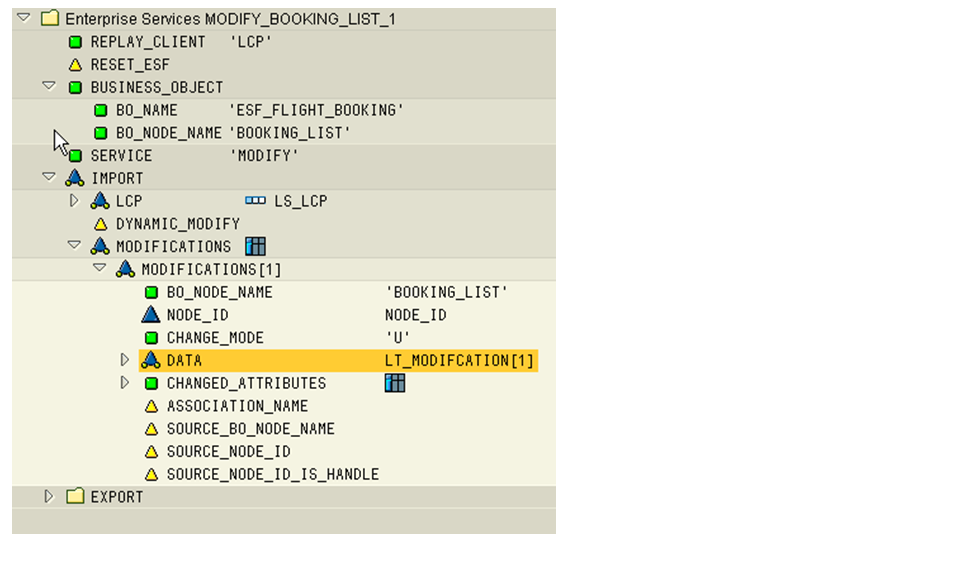
The branch IMPORT-MODIFICATIONS of the command interface of an ESF LCP MODIFY command has the following structure:
|
Node |
Description |
|
BO_NODE_NAME |
Name of the node type to be accessed |
|
NODE_ID |
Node ID or handle in case of creation |
|
CHANGE_MODE |
Create, Update, or Delete. Values: 'C', 'U', or 'D' |
|
DATA |
Node-specific data structure |
|
CHANGED_ATTRIBUTES |
Table of attribute names |
The structure of each DATA node depends on the content of the fields BO_NAME (branch BUSINESS_OBJECT) and BO_NODE_NAME (in the current row of the MODIFICATIONS table).
To make the data structure available in the structure editor, enter BO_NAME, add a row to MODIFICATIONS, enter BO_NODE_NAME in that row, and refresh the command interface.
You can then enter the values to be used for creating, or updating, the BO node in DATA.
For an ESF LCP MODIFY service, the table CHANGED_ATTRIBUTES must be filled with the names of the fields whose values must be taken from, or changed according to, the DATA structure for each row of MODIFICATIONS.
eCATT fills this table automatically at script replay if the table is empty. eCATT adds the field names of all fields in the DATA structure that are not empty.
Exceptions:
-
A field that contains the symbol ' (eCATT &SKIP, apostrophe) will not be added to CHANGED_ATTRIBUTES
-
A field that contains the symbol ' ' (eCATT &CLEAR) will be added to CHANGED_ATTRIBUTES and the same field in DATA will be cleared
Alternatively you can maintain the node CHANGED_ATTRIBUTES in the script editor. In this case eCATT calls ESF LCP with the values you have entered and no additional entries are made to CHANGED_ATTRIBUTES at script replay.
Example
Dynamic Use
eCATT supports the handling of different node types within one MODIFY command to be filled with test data assembled at script runtime.
Within one MODIFICATION table you can supply a dynamic quantity of business object nodes (multiple records, record count only known at script replay time).
This is realized by the parameterization of the DATA node in the branch IMPORT-MODIFICATIONS of the command interface with an eCATT table parameter:
|
Node |
Description |
|---|---|
|
BO_NODE_NAME |
Name of the node type to be accessed |
|
NODE_ID |
Node ID or handle in case of creation |
|
CHANGE_MODE |
Create, Update, or Delete. Values: 'C', 'U', or 'D' |
|
DATA |
Name of eCATT table parameter with node-specific structure |
|
CHANGED_ATTRIBUTES |
Table of attribute names |
The eCATT table parameter supplied in DATA must have the same structure as the DATA specific substructure according to BO_NODE_NAME.
The parameterization of DATA defines which eCATT table parameter must be read to supply the data to ESF LCP.
At script replay, the values from the eCATT table parameter are dynamically assigned to a matching row of the MODIFICATIONS table. The key used to match between the eCATT table parameter and the MODIFCATIONS table is the field NODE_ID.
The eCATT table parameter can contain multiple rowss of the same structured DATA for different NODE_IDs.
If, at runtime, a MODIFICATIONS table row does contain a value in its NODE_ID field, the DATA substructure of that modifications row is filled with the field values of the corresponding record of the eCATT table parameter.
If a MODIFICATIONS table row does not contain a value in its NODE_ID field, eCATT copies that MODIFICATIONS row as often as there are records in the eCATT table parameter and fills each DATA substructure of the modifications rows with the field values of the corresponding records.
Procedure
-
Define an eCATT table parameter for BO-structures with a reference such as BO_STRUCTURE+[]. The '[]' sign specifies that a table is created from BO_STRUCTURE. The '+' indicates that the additional field NODE_ID must be added to the structure of the BO_STRUCTURE.
The table parameter must be filled with correct NODE_IDs and the appropriate data before it is used at the ESF LCP MODIFY command. This can be done in the eCATT editor for the table parameter or at script runtime using script logic.
-
In the field IMPORT-DYNAMIC_MODIFY, enter 'X'.
-
Add a row to the MODIFICATIONS table and enter the BO_NODE_NAME in that row.
-
Refresh the command interface.
The DATA node is changed into a single value input field.
-
Enter the table parameter name as a fixed value in the DATA node field.
Example
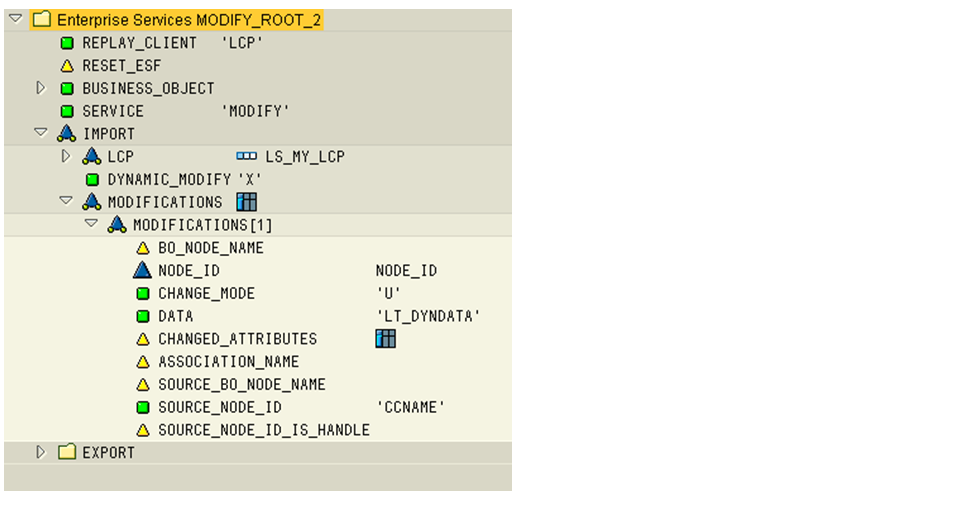
At replay of the script, the dynamic modifications are written to the log. Dynamically modified data are displayed with their values in an additional node, DYNAMIC, of the ESF command.
Dynamic Source Node IDs
The dynamic transfer of DATA into the MODIFICATIONS row of the DATA structure is node-dependent. The value of the SOURCE_NODE_ID in the MODIFICATIONS row can also be supplied dynamically from the data in the eCATT table parameter. The field name in the data structure containing the value depends on the BO node.
The field SOURCE_NODE_ID is filled with the content of the field named in the SOURCE_NODE_ID of the eCATT table parameter from the same row as was used to fill DATA.
Procedure
Enter a field name from the BO node structure in the IMPORT-MODIFICATIONS table row in the field SOURCE_NODE_ID. Enter the field name as a fixed value.
At runtime, the eCATT table parameter is filled with the SOURCE_NODE_IDs. The name of this field is used in the MODIFICATIONS-SOURCE_NODE_ID to replace the values from the table parameter rows in the matching MODIFICATION-DATA rows dynamically.
Automatically populated CHANGED_ATTRIBUTES
In general, the node CHANGED_ATTRIBUTES has a list of attribute names or an eCATT table parameter with this list. These attributes are handled at the Create or Update in the ESF LCP MODIFY command. If the list at the command interface is empty or if the table parameter used here is empty, the CHANGED_ATTRIBUTES are automatically supplied during execution with the attribute names whose values are not initial.