CheckBox
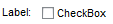
With a CheckBox you can implement a single on/off switch. A CheckBox enables the user to select a Boolean value ( TRUE/ FALSE). The UI element consists of a graphic with text. The checkmark in the box indicates that the option is selected and the value is set to TRUE.
If you want to offer a group of logically related CheckBoxen, use the UI element CheckBoxGroup .
|
|
Implementation Details
|
Runtime Class |
CL_WD_CHECKBOX |
|
Name |
Type |
Initial Value |
Bindable |
|---|---|---|---|
|
STRING |
(automatic) |
No |
|
|
WDY_BOOLEAN |
false |
No |
|
|
WDY_BOOLEAN |
false |
Mandatory |
|
|
WDUI_CONTEXT_MENU_BEHAVIOUR |
inherit |
No |
|
|
WDY_MD_UI_ELEMENT_REFERENCE |
No |
||
|
WDY_BOOLEAN |
true |
Yes |
|
|
Translatable text |
No |
||
|
WDY_BOOLEAN |
false |
Yes |
|
|
WDUI_STATE |
normal |
Yes |
|
|
Translatable text |
Yes |
||
|
WDUI_TEXT_DIRECTION |
inherit |
Yes |
|
|
Translatable text |
Yes |
||
|
WDUI_VISIBILITY |
visible |
Yes |
|
Name |
|---|
Other properties that can be inherited are defined in the related higher-level classes. The related UI elements are:
Accessibility
To enable the development of accessible applications, the tooltip property is checked during the syntax check if the text label properties are not set.
A tooltip does not necessarily have to be set for this UI element, but it could make sense to set it if it contains detailed semantic information.
Dynamic Programming
For dynamic programming, the same properties, events and aggregations are available as in the View Designer. But note that the spelling format and use of upper/lower case is different.
|
View Designer Name |
Runtime Name |
Type |
|---|---|---|
|
ACTIVATE_ACCESS_KEY |
WDY_BOOLEAN |
|
|
CHECKED |
WDY_BOOLEAN |
|
|
CONTEXT_MENU_BEHAVIOUR |
WDUI_CONTEXT_MENU_BEHAVIOUR |
|
|
contextMenuBehaviour: inherit |
CL_WD_CHECKBOX=>E_CONTEXT_MENU_BEHAVIOUR-INHERIT |
|
|
c ontextMenuBehaviour: provide |
CL_WD_CHECKBOX=>E_CONTEXT_MENU_BEHAVIOUR-PROVIDE |
|
|
contextMenuBehaviour: suppress |
CL_WD_CHECKBOX=>E_CONTEXT_MENU_BEHAVIOUR-SUPPRESS |
|
|
CONTEXT_MENU_ID |
WDY_MD_UI_ELEMENT_REFERENCE |
|
|
ENABLED |
WDY_BOOLEAN |
|
|
EXPLANATION |
WDY_MD_TRANSLATABLE_TEXT |
|
|
READ_ONLY |
WDY_BOOLEAN |
|
|
STATE |
WDUI_STATE |
|
|
state: normal |
CL_WD_CHECKBOX=>E_STATE-NORMAL |
|
|
state: required |
CL_WD_CHECKBOX=>E_STATE-REQUIRED |
|
|
TEXT |
WDY_MD_TRANSLATABLE_TEXT |
|
|
TEXT_DIRECTION |
WDUI_TEXT_DIRECTION |
|
|
textDirection: inherit |
CL_WD_CHECKBOX=>E_TEXT_DIRECTION-INHERIT |
|
|
textDirection: ltr |
CL_WD_CHECKBOX=>E_TEXT_DIRECTION-LTR |
|
|
textDirection: rtl |
CL_WD_CHECKBOX=>E_TEXT_DIRECTION-RTL |
|
|
TOOLTIP |
WDY_MD_TRANSLATABLE_TEXT |
|
|
VISIBLE |
WDUI_VISIBILITY |
|
|
visible: none |
CL_WD_CHECKBOX=>E_VISIBLE-NONE |
|
|
visible: visible |
CL_WD_CHECKBOX=>E_VISIBLE-VISIBLE |
|
View Designer Name |
Runtime Name |
|---|---|
|
ON_TOGGLE |
For test purposes you can find examples of this interface element in the system in the Web Dynpro application WDR_TEST_UI_ELEMENTS, and in the component WDR_TEST_EVENTS in the Checkbox view.