Accordion
An Accordion UI element is similar to the vertical version of a TabStrip , with the difference that with Accordion all subordinate elements can be collapsed simultaneously.
|
|
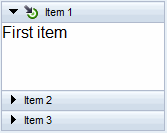
An Accordion contains AccordionItems (and MultipleAccordionItems ), which are displayed by a header. If an AccordionItem is selected, like in the example screenshot Item 1 , its content area is shown below the header ( First item in the screenshot).
Be careful when embedding complex UI elemente such as Accordion, FlashIsland, SilverlightIsland, InteractiveForm, IFrame, Gantt, and so on: AccordionItems can contain scrollbars. Due to technical restrictions of the browser, which are beyond the control of Web Dynpro ABAP Framework, problems may occur with scrollbars when rendering these active UI elements.
Comparison with TabStrip
-
Similar functions
-
The same as TabStrip, Accordion provides drag and drop functions.
-
The same as with TabStrip only one entry at a time can be selected.
-
-
Other functions
-
Different to TabStrip all entries can be deselected at the same time, but only if you set property Accordion.allowDeselect to TRUE.
-
Different to TabStrip there are two types of subordinate elements that can be aggregated: AccordionItems and MultipleAccordionItems, whereby the latter are simply AccordionItems that are multiplied across the context. AccordionItems and MultipleAccordionItems behave together like RoadMapStep does with MultiRoadMapStep, or BreadCrumbStep does with MultipleBreadCrumbStep.
-
Implementation Details
|
Runtime Class |
CL_WD_ACCORDION |
|
Name |
Type |
Initial Value |
Bindable |
|---|---|---|---|
|
STRING |
(automatic) |
No |
|
|
WDY_BOOLEAN |
false |
Yes |
|
|
WDUI_CONTEXT_MENU_BEHAVIOUR |
inherit |
No |
|
|
WDY_MD_UI_ELEMENT_REFERENCE |
No |
||
|
WDY_BOOLEAN |
true |
Yes |
|
|
STRING |
Yes |
||
|
Translatable text |
Yes |
||
|
WDUI_VISIBILITY |
visible |
Yes |
|
Name |
Cardinality |
Type |
|---|---|---|
|
0..1 |
||
|
0..1 |
||
|
0..n |
AccordionItem |
Other properties that can be inherited are defined in the related higher-level classes. The related UI elements are:
Dynamic Programming
For dynamic programming, the same properties, events and aggregations are available as in the View Designer. But note that the spelling format and use of upper/lower case is different.
|
View Designer Name |
Runtime Name |
Type |
|---|---|---|
|
ALLOW_DESELECT |
WDY_BOOLEAN |
|
|
CONTEXT_MENU_BEHAVIOUR |
WDUI_CONTEXT_MENU_BEHAVIOUR |
|
|
contextMenuBehaviour: inherit |
CL_WD_ACCORDION=>E_CONTEXT_MENU_BEHAVIOUR-INHERIT |
|
|
contextMenuBehaviour: provide |
CL_WD_ACCORDION=>E_CONTEXT_MENU_BEHAVIOUR-PROVIDE |
|
|
contextMenuBehaviour: suppress |
CL_WD_ACCORDION=>E_CONTEXT_MENU_BEHAVIOUR-SUPPRESS |
|
|
CONTEXT_MENU_ID |
WDY_MD_UI_ELEMENT_REFERENCE |
|
|
ENABLED |
WDY_BOOLEAN |
|
|
SELECTED_ITEM |
STRING |
|
|
TOOLTIP |
WDY_MD_TRANSLATABLE_TEXT |
|
|
VISIBLE |
WDUI_VISIBILITY |
|
|
visible: none |
CL_WD_ACCORDION=>E_VISIBLE-NONE |
|
|
visible: visible |
CL_WD_ACCORDION=>E_VISIBLE-VISIBLE |
|
View Designer Name |
Runtime Name |
Cardinality |
|---|---|---|
|
DRAG_SOURCE_INFO |
0..1 |
|
|
DROP_TARGET_INFO |
0..1 |
|
|
ITEMS |
0..n |
You can find an example of this UI element in the WDR_TEST_ACCORDION component.