Specifying Target Systems
In a test script, the RFC destinations are not specified directly. You specify the RFC destinations in a system data container, where you assign them to target systems. You create the names of the target systems yourself, and it is these names that you use in the test script.
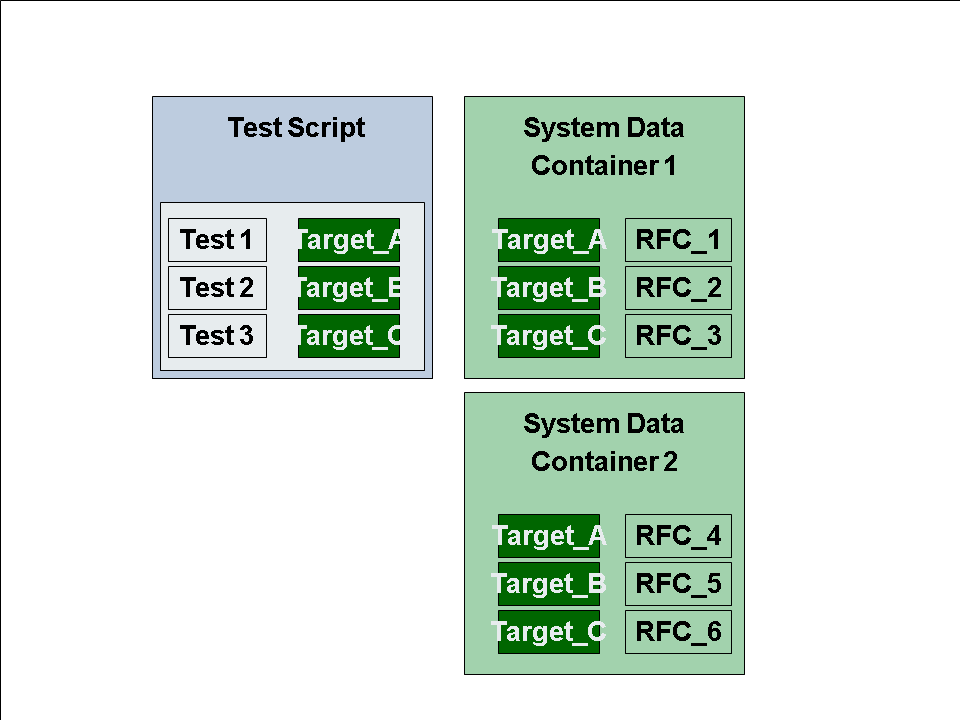
In a system data container, you could have:
|
Target System |
RFC Destination |
|
TARGET_A |
RFC_1 |
|
TARGET_B |
RFC_2 |
|
TARGET_C |
RFC_3 |
In a test script, you could have:
TCD ( <transaction code>, <command interface> , TARGET_A ).
TCD (<transaction code>, <command interface> , TARGET_B )
CHETAB ( <table>, <command interface>, TARGET_C ).
WEBDYNPRO ( <command_interface>, TARGET_A ).
The advantage of this separation of test script and RFC destinations is that you can change the systems under test without having to change the test script. You can simply assign a different system data container, containing a different set of RFC destinations, to the test script. You can do this in a test configuration, or in the start options when executing the test..
-
Create RFC destinations for the systems in the test landscape (use transaction SM59).
-
Create a system data container.
-
Create a test script and assign the system data container in the attributes of the test script.
-
Assign target systems to individual commands. You can use various methods to do this, but the target system is usually selected when entering the command using the Insert Statement function in the Test Script Editor .