Validation
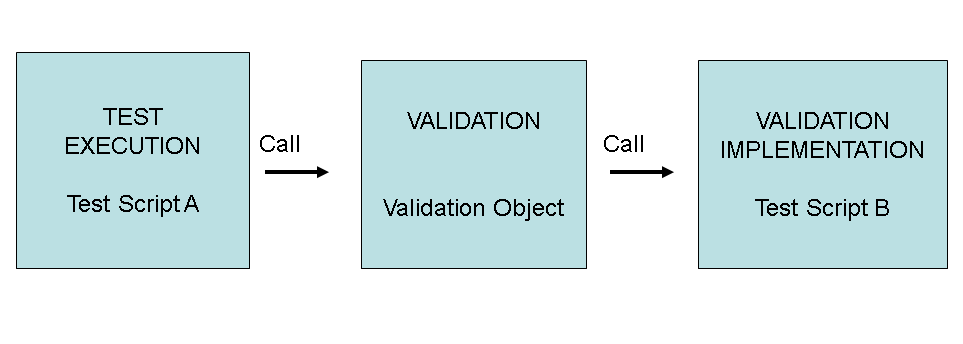
Validation objects allow you to separate the validation logic from the test script -that is, the script contains the commands for test execution as normal but calls a validation object when validation is to be performed. The test script calls a validation object using the VALIDATE command.
Parameters
A validation object can only have import parameters; these are the import parameters of the script containing the implementation. These can be displayed on the Parameters tab.
Validation Results
You can invert the validation result by selecting the Invert Validation check box. This allows an implementation to be used in cases where the verdict should be the opposite of that normally delivered. Inversion has no effect on technical errors; these always result in a fail status.
Business Messages
For each possible validation result (pass, fail, or technical error), you can specify a message. If the message type is T100, the message key is of the form <message ID>:<message number>, for example, ECDEMO:031. If the message type is OTR, the message key is the key for the logical object in the OTR (see transaction SOTR_EDIT, field Concept), for example, 6E276ABDE832C4419088D771B87C85B2.
Messages are displayed in the log.
Implementation
Currently, the implementation of the validation logic uses the eCATT script language (there may be other possibilities in the future). The validation object references an eCATT script containing the implementation. In the implementation, SETVALID commands determine the status (pass or fail) of the validation. The last SETVALID evaluated determines the status unless a technical error has occurred.
Implicit SETVALID at Check Commands
A validation script can contain eCATT check commands (this is more likely if you are reusing existing scripts rather than writing the script specifically for the validation implementation). For certain conditions, these will produce implicit SETVALID passed or failed results. If a check is successful, the validation result is pass. If the check is unsuccessful, the validation result is fail (see the table below). The failed checks in these circumstances do not cause the usual script failure (other errors, such as the non-existence of a table with CHETAB do cause script failure).
Commands and Their Validation Fail Conditions
|
Command |
Condition |
|---|---|
|
CHEVAR |
Condition is not met. |
|
CHETAB |
Entry not found. |
|
CHEATTR |
Attribute check not matched. |
|
CHESTATIC |
Static attribute not matched. |
|
CHEGUI |
Field check not matched. |
|
SAPGUI (InitialState) |
Field check not matched. |
|
TCD |
Expected message did not occur or field check not matched. |
|
ENDMESSAGE |
Expected message did not occur |
|
LOGMSG |
Message type E, A or X. |
|
WEBDYNPRO |
Field check not matched. |
If the result of an implicit SETVALID is fail, the further execution of the validation script is determined by the start options. Only the start option S - Continue with next script command allows the execution to continue.