Parameterizing an Input Value
Prerequisites
You changed the input value during recording.
Context
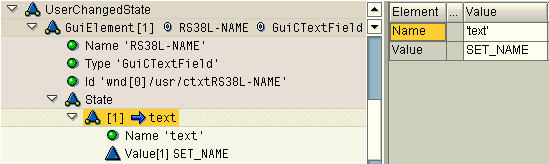
You parameterize input values under UserChangedState nodes. Every GUI element that you can communicate with during recording contains its own GuiElement node under the UserChangedState node. A blue arrow pointing to an attribute name under a state node indicates a SET parameter. This allows you to set, but not get, the contents of fields on screens.
Procedure
-
In the structure editor, expand the interface to find the relevant State node.
-
Double-click the blue arrow beside the attribute.
A grid is displayed on the right.
-
Edit the Value row.
Do not edit the Name row.
Example