Checkboxes and Radio Buttons in SAPGUI
When recording with the SAPGUI command, only user actions are recorded. This means that if you do not change the state of a checkbox or radio button during recording, you cannot control the state of it during the execution of the test script (see Parameterizing the IDs of Controls for an exception to this).
For checkboxes, the state of the checkbox is specified by the value of its selected element in the command interface.
|
Value |
Description |
|---|---|
|
'X' |
Checkbox will be selected during execution. |
|
' ' |
Checkbox will be deselected during execution. |
|
'''' |
Checkbox will not be changed during execution. |
The Shared tab of the eCATT start options has four checkboxes: Log Display, Archiving, Close RFC Connection, and Use Asynchronous RFC. By default, Log Display is selected and the others not. If, during recording, you ignore the log display, select Close RFC Connection, and select and then deselect Archiving and Use Asynchronous RFC, you get the settings as shown in the following screenshot:
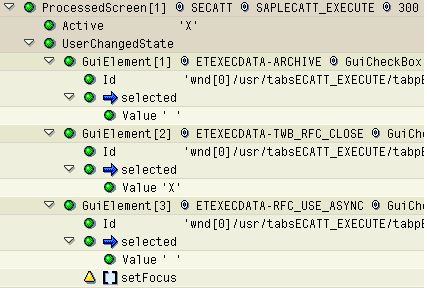
The states of any of the three checkboxes shown can be altered by changing the value of the relevant selected element. The Log Display checkbox cannot be changed because it does not exist under the UserChangedState node.