AbstractToggleButton Properties
-
checkedImageSource
Name of the symbol that indicates that the UI element is selected (see imageSource).
More information : Handling Web Icons
This property can be personalized by administrators.
-
design
Display of the UI element.
This property can be personalized by administrators.
Value
Example of the Visual Display
Description
Can be Set Using Personalization
standard
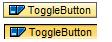
With the standard display, the appearance (flattened) of the ToggleButtons changes when the ToggleButton is selected.
Yes
toggle
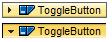
Display as with the standard but has a symbol that changes when the button is selected
Yes
-
imageFirst
Position of the symbol with reference to the text.
This property can be personalized by administrators.
-
imageSource
Symbolic name of the symbol to be displayed when the Button is not selected (compare with checkedImageSource).
More information : Handling Web Icons
This property can be personalized by administrators.
-
text
Label text that is displayed as the explanatory text within the ToggleButton.
This property can be personalized by administrators.
-
width
Width of the UI element.
More information : Methods and Properties - General Information .
This property can be personalized by administrators.