AbstractTreeNodeType Properties
-
dataSource
Data source. You can use it to specify the path to the context attribute, which makes the data available.
-
design
Display of the UI element.
Value
Visualization
Description
emphasized
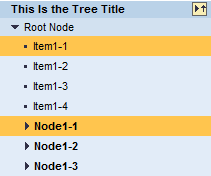
The UI element is highlighted.
standard

Standard display of the UI element.
-
iconSource
Name of the symbol to be displayed. See also Handling Web Icons
-
ignoreAction
Specifies that the action that is expected to be executed on onAction, is in fact not executed.
-
text
Label text of a node element in the Tree.
-
textDirection
Text or writing direction.
This enables labels of interface elements to be read in languages that have an RTL writing direction, such as Arabic or Hebrew, as opposed to LTR for languages like English.
This property can be personalized by administrators.
Value
Description
Can be Set Using Personalization
INHERIT
The text direction is inherited from the parent element. Therefore, the text direction is identical to that of the parent element.
Yes
LTR
Left to right text direction
Yes
RTL
Right to left text direction
Yes
-
tooltip
Quick info text that appears when the user moves the mouse pointer over the UI element. If Screen Reader is supported, extra text is added automatically to the tooltip in order to support accessibility.