Sorting
You can change the sequence of data records according to specific rules by sorting the ALV output. You specify which fields contain the values that are to be sorted alphabetically or numerically, and that therefore determine the sequence of all rows.
You can make the following settings for sorting:
-
Create, get, and delete sort settings (sort conditions)
-
Specify sort direction and sort order
-
Group values that are the same
-
Disallow sorting for a field
-
Enable sorting by clicking a column header
-
Sort a field using the values of another field
-
Hiding and showing tabs for sorting
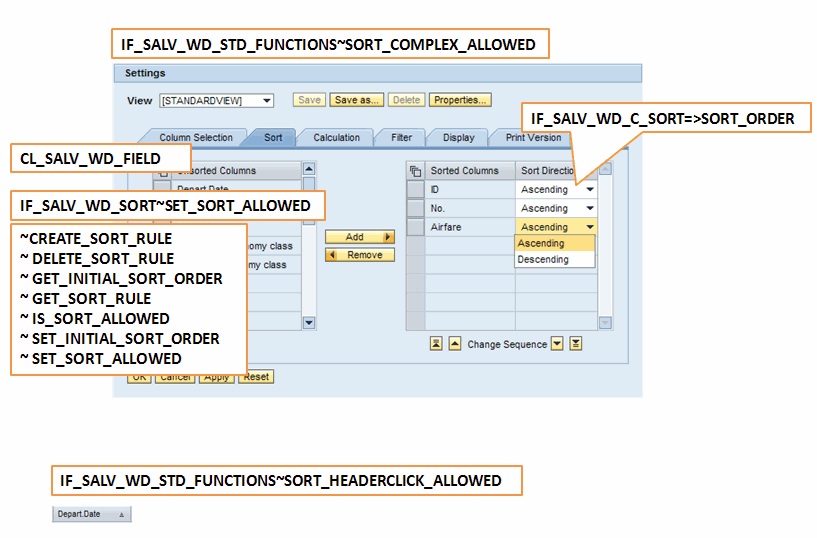
Creating, Getting, or Deleting Sort Conditions for a Field
Sorting is a field property in the ALV output (see Fields ). To create, get, or delete the sort condition of a field, you use the methods of interface class IF_SALV_WD_SORT (implementing class CL_SALV_WD_FIELD).
Methods for creating, getting, and deleting the sort condition
|
Function |
Method |
|
Get sort condition |
GET_SORT_RULE |
|
Create sort condition |
CREATE_SORT_RULE |
|
Delete sort condition |
DELETE_SORT_RULE |
The sort condition of a field is represented by an object from class CL_SALV_WD_SORT_RULE.
If you assign a new data table with a new structure to your ALV output, all sort conditions for all fields are deleted automatically.
Specifying the Sort Direction and Sort Order
For each individual sort condition, you can specify whether you want to sort field values in ascending (a, b, c) or descending order (c, b, a): You specify the sort direction.
If you sort the ALV output by multiple fields, the result changes depending on the sequence in which fields are sorted. By default, the fields are sorted in the sequence in which you generated your sort conditions. You can change this sequence. To do this, you assign a position number in the sort sequence to the field (or its sort condition).
To change the sort direction or sort sequence of a sort condition, you use the methods of class CL_SALV_WD_SORT_RULE.
Methods for the sort direction and sort sequence
|
Function |
Method |
|
Specify sort direction |
SET_SORT_ORDER |
|
Get sort direction |
GET_SORT_ORDER |
|
Specify position of field within sort order |
SET_SORT_POSITION |
|
Get position of field within sort order |
GET_SORT_POSITION |
You can also specify the preferred sort direction for the field when the user sorts the corresponding column.
To define the desired sort direction for a field, you use the methods of interface class IF_SALV_WD_SORT (implementing class CL_SALV_WD_FIELD).
Method for the preferred sort direction
|
Function |
Method |
|
Specifying Preferred Sort Direction |
SET_INITIAL_SORT_ORDER |
|
Getting the Sort Direction |
GET_INITIAL_SORT_ORDER |
Group values that are the same
By default, values that are the same are combined in a sorted field in a sorted ALV output. The values are grouped. Column objects are grouped. You can specify that a value is to appear in each row, even if this value does not change. To do this, you use the methods of interface class IF_SALV_WD_SORT (implementing class CL_SALV_WD_FIELD).
Methods for Grouping Sorted Values
|
Function |
Method |
|
Group values/remove grouping |
SET_GROUPING_ALLOWED |
|
Check whether values are grouped |
IS_GROUPING_ALLOWED |
Disallow sorting for a field
You can explicitly disallow sorting for a field. This has the following effects:
-
The relevant field is no longer displayed on the Sorting tab page of the Settings dialog box.
-
If you allow users to sort columns by clicking column headers (see below), the function is not available for the column for which you have disallowed sorting; the arrow icons are hidden.
-
If you defined a sort condition for this field in your application, this sort condition has no effect on the ALV output.
To disallow sorting for a field, you use the methods of interface class IF_SALV_WD_SORT (implementing class CL_SALV_WD_FIELD).
Methods for Forbidding Sorting
|
Function |
Method |
|
Disallow sorting |
SET_SORT_ALLOWED |
|
Check whether sorting is allowed |
IS_SORT_ALLOWED |
Enable sorting by clicking a column header
You can display small arrow icons in the column headers of the ALV output. Users can use these arrow icons to sort the columns in ascending or descending order.
You can also specify whether users can sort by just one column, or whether they can sort by multiple columns by using the CRTL key.
To enable users to sort by clicking a column header, you use the methods of interface class IF_SALV_WD_STD_FUNCTIONS (implementing class CL_SALV_WD_CONFIG_TABLE).
Methods for Sorting by Clicking a Column Header
|
Function |
Method |
|
Show arrow icons in column headers |
SET_SORT_HEADERCLICK_ALLOWED |
|
Check whether arrow icons are shown in column headers |
IS_SORT_HEADERCLICK_ALLOWED |
To enable users to sort multiple columns by clicking column headers, you use the methods of interface class F_SALV_WD_TABLE_SETTINGS (implementing class CL_SALV_WD_CONFIG_TABLE).
Methods for Sorting Multiple Columns by Clicking Column Headers
|
Function |
Method |
|
Enable sorting for multiple columns |
SET_MULTI_COLUMN_SORT |
|
Check whether sorting by multiple columns is allowed |
GET_MULTI_COLUMN_SORT |
Sort a field using the values of another field
You can specify a field using which the current field is to be sorted if the field itself does not return the required result. To do this, you use the methods of interface class IF_SALV_WD_COLUMN_SERVICE_REF (implementing class CL_SALV_WD_COLUMN).
Methods for Sorting Using the Values of Another Field
|
Function |
Method |
|
Specify field name of another field |
SET_SORT_FIELDNAME |
|
Get field name of another field |
GET_SORT_FIELDNAME |