Objects of the ALV Configuration Model
The object model for the ALV configuration model consists of the following classes and interfaces:
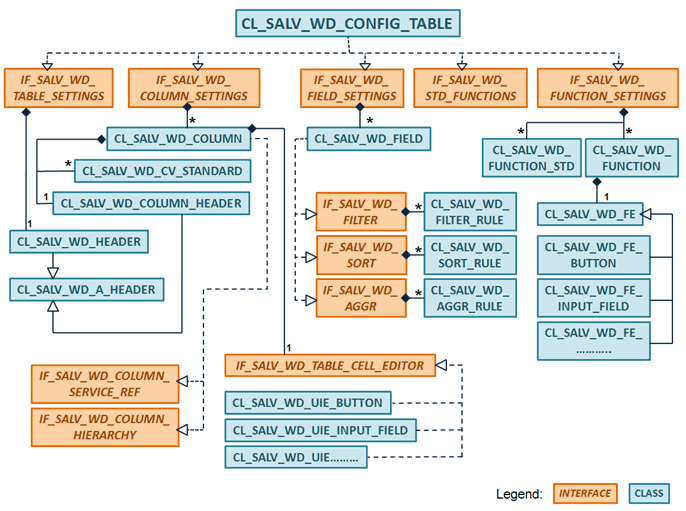
This class diagram has been simplified. You can find the exact structures in the system in package SALV_WD_CONFIG .
The following main areas are available for configuring your ALV display:
-
Table Settings ( IF_SALV_WD_TABLE_SETTINGS )
The data for the Table UI element includes the structure of the application data as well as the technical fields that determine the appearance or function of the ALV display. You can define, for example, whether the ALV display is to be displayed with a simple, two-dimensional table or as a hierarchy with a leading hierarchy column.
-
Column Settings ( IF_SALV_WD_COLUMNS_SETTINGS )
The column objects are visible elements that define the ALV display. The columns have the same names as the corresponding field objects and attributes in the context node. The column object contains settings as to whether and how the data for the field of the same name is displayed in the ALV display. If you do not want to display the values of the field, you can delete the corresponding column object.
You use the column settings to manage a list of all the column objects (the columns for the Table UI elements).
-
Field Settings ( IF_SALV_WD_FIELD_SETTINGS )
The fields describe the data that is used in the ALV display. The name of a field matches the name of an attribute in the context node: All fields objects are automatically created from the specifications you made for the attributes in the context node. As a result, every attribute in the context node has a representative with the same name in the ALV Configuration Model .
By connecting the internal data table to the context node you fulfill all the prerequisites to start your application with ALV. You can sort the data with statements from your application, filter it, or perform applications. All these functions (ALV services) are essentially field object methods. You cannot, however, display the data yet. To do this, you need columns.
-
ALV Standard Functions Settings ( IF_SALV_WD_STD_FUNCTIONS )
ALV provides a number of functions. The following list shows the most important of these standard ALV functions:
-
ALV services: Sorting, filtering, aggregating (calculations), as well as the option to make all the necessary settings for these services.
-
Settings you can provide for editable ALV display, such as inserting and deleting rows.
-
Exporting the ALV display to Microsoft Excel or generating a print version in PDF format.
All these standard functions are accessible using the relevant UI elements. You can hide or show these UI elements by using the standard function settings.
-
-
Settings for Application-Specific Functions ( IF_SALV_WD_FUNCTION_SETTINGS )
You can define as many functions as you want in your application and provide suitable UI elements to the user with which he or she can then run these functions.