Web Dynpro Tools in the ABAP Workbench
Web Dynpro Explorer has been fully integrated in the ABAP Workbench (SE80) and does not have a separate transaction code. In the first processing step, you use the object list selection and display an existing Web Dynpro component or create a new one:

The following sections describe in detail the tools contained in the Web Dynpro Explorer. These sections summarize all the functions of all Web Dynpro tools, so that you can access individual pieces of information as you develop a Web Dynpro application.
The programming manual in this documentation contains an overview of programming with Web Dynpro.
The Web Dynpro Explorer provides tools for the following:
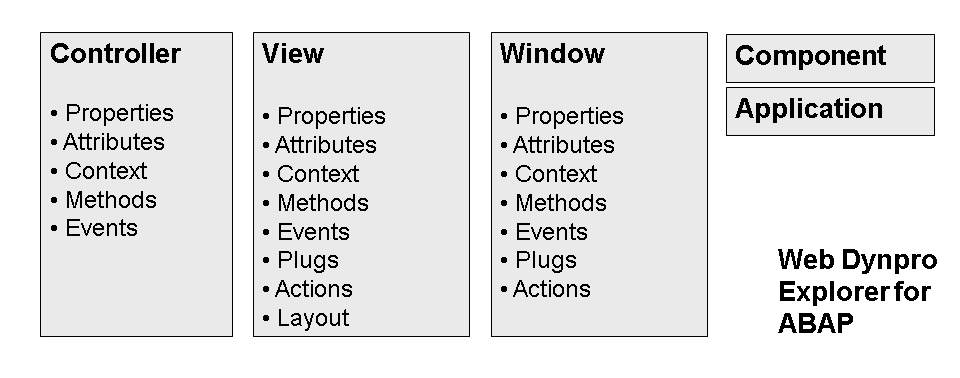
In the View Editor , you maintain all the elements of a view, that is, also the elements of the respective controller and its context.
The Controller Editor is used to maintain all other controllers, that is, component and interface controllers as well as any custom controllers that may have been added:
-
Display Interface ViewYou can display the inbound and outbound plugs of an interface view separately. The plugs are created and maintained in the Window Editor as part of the corresponding window. In the Window Editor, in the Interface column you can determine whether a plug is also assigned to the interface view of the window and whether it should also be visible outside of the component.
-
The components of the interface controller are a subset of the component controller. They can be displayed separately for the interface controller, although its events and methods as well as its context are created and maintained in the Component Editor. Even in this case you can assign parts of the component controller selectively to the interface controller.
In addition to the tools for the main components of Web Dynpro ABAP applications, the following sections describe other important tools and functions that are useful for developing Web Dynpro ABAP:
-
Refactoring for Web Dynpro ABAP
The refactoring concept enables you to delete and rename objects belonging to a Web Dynpro component.
Web Dynpro ABAP objects are integrated in the note assistant.
Furthermore, you can test Web Dynpro applications using the Extended Computer-Aided Test Tool (eCATT).
More information : eCATT and Web Dynpro ABAP
To create a new Web Dynpro component, enter a new name in the selection dialog of the object list, and select
 . In the dialog box that appears, you can enter a description of the new object and decide whether you want to create a Web Dynpro component or a
Web Dynpro Component Interface .
. In the dialog box that appears, you can enter a description of the new object and decide whether you want to create a Web Dynpro component or a
Web Dynpro Component Interface .
More information: Go and Create: First Application with Web Dynpro ABAP
You can find platform-independent information about Web Dynpro and an introduction to the terms that are used in general in the Web Dynpro section of the Architecture Manual.
You can find the complete Web Dynpro for ABAP documentation at Web Dynpro ABAP .