Development Scenarios for Handheld Applications
The design-time and runtime environments of Mobile Applications for Handhelds are fully integrated in SAP NetWeaver Mobile and the SAP NetWeaver Development Infrastructure (NWDI). Two development scenarios for Handheld Applications are provided:
-
Composite
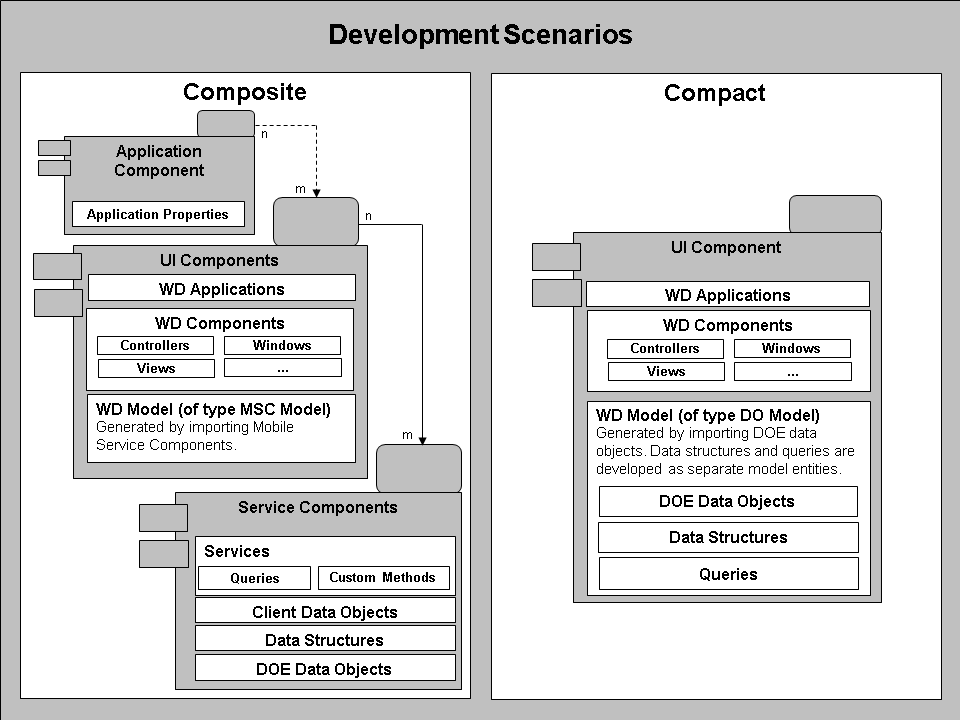
The Composite Development Scenario is based on a structure of distinct, dedicated, reusable components reflecting a structure of clearly separated of layers for business logic and data access, for user interface and for composition of the former into mobile applications. Development tools allow for modeling of most parts of the application, while permitting the inclusion of custom code at selected, well-defined places. For user interface development, standard Web Dynpro (WD) tools, concepts, and Application Programming Interfaces (APIs) are used.
This scenario is suited for all Handheld Applications based on business processes as well as for the creation of reusable components.
-
Compact
In the Compact Development Scenario, a Handheld Application is developed as a normal Web Dynpro application, in which data access and business logic are developed as part of the Web Dynpro model itself and thus not separated into dedicated layers.
This scenario is suited for the quick development of demonstrations and test applications.
Here is a diagram showing the component structure of the two scenarios:
The table below lists the main aspects of the two scenarios:
|
Aspect |
Composite |
Compact |
|
Scenario use |
Complex, productively used mobile applications |
Quick development of demonstrations and test applications |
|
Component structure |
Clear separation of layers (business logic, data access, user interface, and composition) into distinct, dedicated, reusable components |
Mobile application consists of a single component only |
|
NWDI integration |
Yes |
Yes |
|
Web Dynpro integration |
Yes |
Yes |
|
Web Dynpro model generation |
By importing Service Components containing the business logic of the mobile application |
By importing data objects from the Data Orchestration Engine (DOE) The model is subsequently enhanced by adding data structures and queries as dedicated Web Dynpro model classes. |
|
Support for custom business logic |
Yes, through custom methods in Service Components |
Only indirectly by adding custom code into the Web Dynpro component controller |