Key Mapping Between Associated Data Objects
When you define an association between two attributes of different data objects, the system must be able to map the associated nodes. This requires an additional field in the node in which you define the association to hold the synchronization key (SyncKey) of the associated data object node. You can either define this field yourself or configure the system to generate the key when you define the association. In the latter case, the system generates the field based on the association key you specify (for example, if you specify CUS as the association key, the system generates a field called CUS_SYNCKEY_DOE).
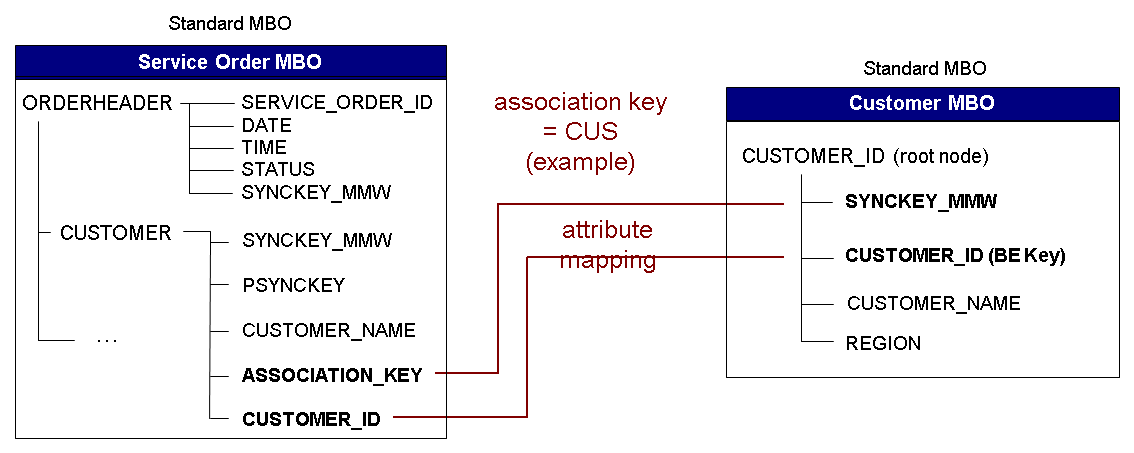
In this example, the user has added the field ASSOCIATION_KEY to the CUSTOMER node of the Service Order data object and mapped it to the SyncKey field (SYNCKEY_DOE) of the root node of the associated Customer data object.
If the user does not add a field for holding the key, the system does the following:
-
Creates a field named CUS_SYNCKEY_DOE in the CUSTOMER node of the Service Order data object.
-
Maps the field to the SYNCKEY_DOE field in the Customer data object.