Tutorial: Creating a Service Order Application
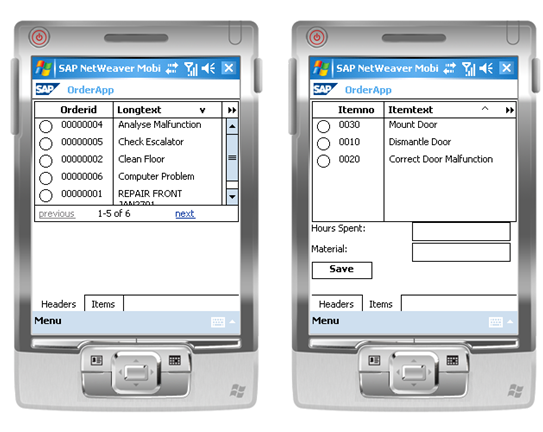
This tutorial explains how to use SAP NetWeaver Developer Studio to develop a simple service order application for a handheld client device that displays a list of orders and allows you to filter list. This application distributes service orders that are created in the back-end system to the relevant field staff and displays the orders on the mobile device. Service technicians can then maintain time and material spent for each order item and upload the changes to the application back end. The tutorial concentrates on client-side development and uses a data model created in the Data Orchestration Engine (DOE). The completed application looks like this when deployed to a Microsoft Windows mobile device:
Objectives
This tutorial provides you with a quick and easy introduction to the development paradigm and the tools required to develop mobile applications for handheld devices. The tutorial employs the following features of SAP NetWeaver Developer Studio:
-
Service Explorer: mobile service components, data objects, services, queries, and custom operations
-
UI Explorer: Web Dynpro (WD) application wizard, WD template for component controller, view layout and context, context mapping, data binding, action buttons, and application deployment
The first section Creating the Basic Application shows you how to:
-
Create mobile service components, mobile UI components, and mobile applications
-
Import data objects from the DOE
-
Define queries and custom operations
-
Model UI views, create contexts, and handle actions
-
Build, deploy, and run a mobile application
The end result of this first development stage is an application that downloads orders and displays their headers in a read-only tabular format.
Two subsequent tutorials explain how to enhance the basic mobile application:
-
Enhancing the Application to Display Order Items enhances the application with a second table to display order items when the order header is selected in the first table.
-
Enhancing the Application: Data Upload and UI Clean-Up adds functionality for editing time and material used for a selected order item, saving these changes to the database, and uploading the changes to the application back end. This development also cleans up the application's user interface by employing tabstrips for the header table and item table, form fields, and save button.
Installations and Configurations
-
You have installed SAP NetWeaver Developer Studio (SAP NWDS) and the mobile plug-ins for SAP NWDS on the development workstation. For more information, see Installing Mobile Plug-Ins in the IDE
-
You have SAP NetWeaver Developer Studio to connect to the DOE. For more information, see Configuring the Development Workstation
-
You have developer authorization for a SAP NetWeaver Application Server on which the DOE is configured.
For more information about DOE configuration, see the SAP NetWeaver Mobile Configuration Guide.
Knowledge
-
The client side of the tutorial requires basic knowledge of Java and Web Dynpro.
-
Creating the necessary data objects (tables and function modules) in the back-end system and data model in the DOE requires basic ABAP developer skills and DOE developer knowledge respectively.
Data Model
The mobile application on the handheld device uses data from a data model on the DOE. For a brief explanation of how to create the necessary data model in the DOE, see Prerequisites for Developing the Mobile Application .