Defining Context Binding
The data objects imported from the DOE are available in the models that you defined. For the data to be available in the views, you must define a context binding (or context mapping) from the views to the models, via the component controller.
For mapping the context of the models to the views, perform the following steps:
-
Embed the models in the component controller
-
Define context binding from the component controller to the models
-
Define context binding from the views to the component controller
-
Expand the Customer Comp node. Click Used Models with the secondary mouse button and choose Add .
-
Select ServiceModels and choose OK .
This ensures that the model classes that you defined in the development component DC storage can be used in the current DC (servapp)
-
Click CustomerComp with the secondary mouse button, and choose Open Data Modeler .
-
On the toolbar that appears on the left hand side, select Create Data Link .
-
In the Data Modeler view, from the Component C ontroller click and drag the mouse pointer to the ServiceModels .
-
In ServiceModels context (seen in the right pane of the window), click and drag all the node elements to the CustomerComp context (seen in the left pane of the window).
-
Select all the node attributes and choose Finish .
The diagram below shows the mapping from the ServiceModels context to the CustomerComp context.

You have now mapped the data from the model classes to the component controller. You must similarly map the data from the component controller to the views as listed below:
-
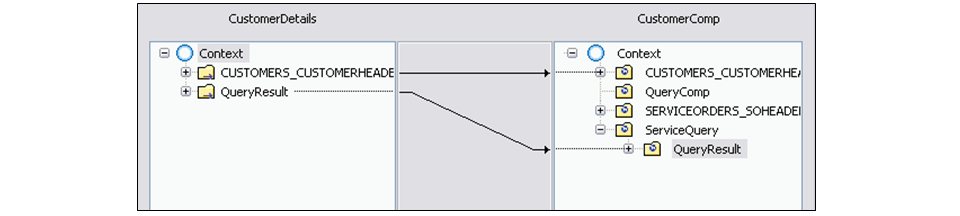
For the CustomerDetails view, map the Customer node attributes and the QueryResult attributes of the Service node from the component controller.
This mapping is shown in the diagram below:
-
For the OrderDetails view, map the QueryResult attributes of the Service node from the component controller.
This mapping is shown in the diagram below:
