Defining Filters at Data Object Nodes
You have application scenarios where the entire instance of a data object is not required at the client device. You then have to filter the data object instances in the Data Orchestration Engine (DOE). Filtering rules can be created at the node-level of the data objects. By creating the rules, the client receives only data that is relevant within the data object instance. This reduces the amount of data transferred to the receivers.
At the DOE, filtering can also be achieved through associations and item-level filtering. Node-level filtering can be used if you do not have associations between data objects.
Consider a scenario where automobile mechanics receive service requests on their client device. The application on the client device displays the records of the automobile data object (shown in the following diagram).
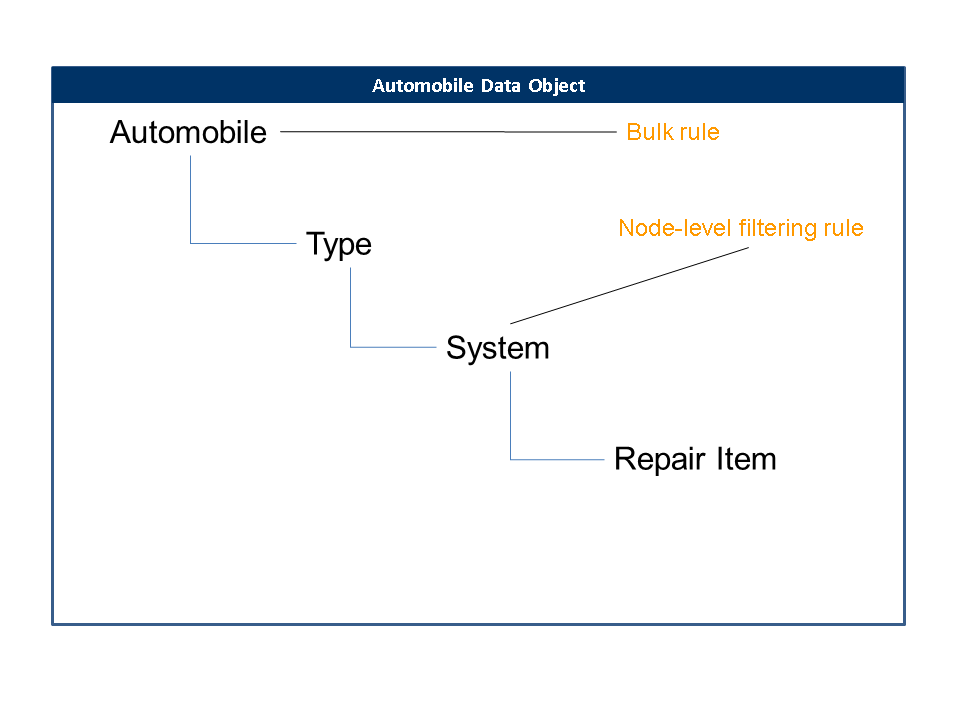
In the automobile data object: Type refers to cars, buses, trucks and vans; System refers to engine assembly, brake assembly and so on; Repair item refers to a specific part of the system like the engine's piston, carburetor and so on.
In this example, the automobile data object has a bulk rule that distributes the instances to all automobile mechanics. Now, system service is a specific action required for the automobile and only specialists for the particular system can service the automobile. So, the service request must go only to the system specialists. This is achieved by defining a filtering rule at the system node.
Following is the runtime behavior of data sent to the receivers:
-
Only those records of the system node are sent by the DOE whose user profile matches with the system.
-
Only those records of the repair item node are sent by the DOE that are related to records of the system node.
-
All records of the automobile node are sent by the DOE, because of the bulk rule.
-
All records of the type node are sent by the DOE, because of the bulk rule.
When defining line item filters, you can make use of operators like equal to, greater than, lesser than and so on. We recommend that you make use of the equal to operator for defining the rules as much as possible. Using operators other than equal to may impact the performance of the system.
-
Log on to SAP NetWeaver Web AS.
-
Choose
 Data Orchestration Engine
  Development Data Orchestration Workbench
  .
. -
Double-click the distribution model on which you want to create the item level filtering.
-
Choose Used Data Objects tab page.
-
Select the data object and choose Add Node Level Filter Rule .
-
The Distribution Rule wizard starts. Follow the instructions in the wizard to create the filtering rule.
The design-time filters that are necessary for your application must be activated using the portal interface. You must delete those design-time filters in the DOE workbench that are not activated in the portal