Distribution by Value Range
The following example illustrates the use of the Between operator in rule creation to refer to a value range defined in the back end, and the use of a subscription generation data object.
Scenario
A service organization in which the service centers are organized by zip code ranges:
-
Service Center A is responsible for zip codes 10000 to 19999
-
Service Center B is responsible for zip codes 20000 to 29999 and so on.
This range is defined in the back end.
The service orders, together with the data of the product to be serviced and the customer involved, are to be distributed to all the devices assigned to a specific service center according to their zip code. (There they are distributed further, but to keep the example simple, this is not covered here).
Data Model and Distribution Logic
The following figure illustrates the distribution logic to be created:
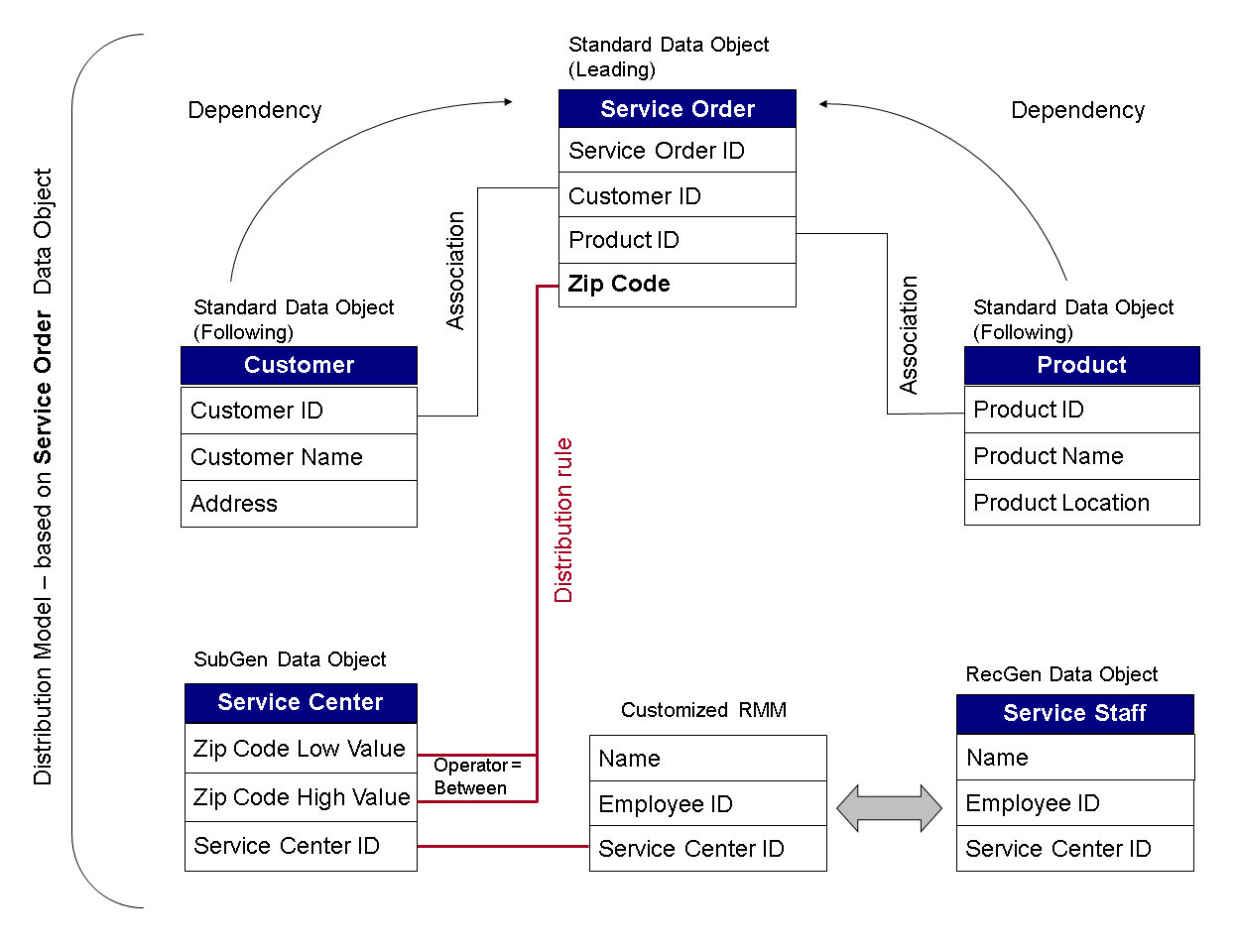
The zip code must be recorded in the Service Order data object as this is the main criterion by which the service orders are distributed. According to the logic above, the device holds the service center ID to which the device owner (employee) is assigned. The subscription generation (SubGen) data object makes sure that the devices for a specific service center only receive the service orders with zip codes in the zip code range defined for the service center. The dependencies make sure that the relevant customer and product information is distributed together with the service order.
Data and Distribution Logic Modeling
You can model this scenario as follows:
-
You create and activate the following data objects:
-
Three standard data objects: Service Order, Product and Customer with the attributes that reflect the information that you want to be contained.
-
A receiver generation data object containing the service center ID to which the device is assigned.
-
A subscription generation data object for the service center. This data object must have an attribute for the lowest value of the zip code range and an attribute for the highest value of the zip code range, plus an attribute for the service center ID.
RecommendationWe recommend that you add associations between the Service Order data object and the Product and Customer data objects to ensure referential integrity in the consolidated data store (CDS).
-
-
You customize the receiver meta model (RMM).
-
You create a distribution model for the Service Order data object because it contains the main criterion for the distribution of the service orders: the zip code.
-
You add the following dependencies, using the associations you have defined for the data objects:
-
Leading data object: Customer, Following data object: Service Order
-
Leading data object: Service Order, Following data object: Product
-
-
You create a distribution rule for the Service Order data object, using the following values:
-
Rule Details
Field
Action
Rule Name
Enter a name of your choice.
Description
Enter a description of your choice.
Data Object Name
No action required. Displays the name of the data object for which the distribution model was created, for example SERVICEORDER.
-
Rule Fields
Field
Action
Node
Choose the node that contains the zip code attribute.
Node Attribute
Select the attribute that holds the zip code and click >.
Operator
Enter BT for the Between operator.
-
Logic Selection
Field
Action
Subgen Mapping, Device Attribute Mapping, None
Select Subgen Mapping .
Receiver Category type
Choose MOBILE.
SubGen Data Object name
Choose the subscription generation data object you have defined for the zip code range and service center ID.
Device Attribute Mapping
Click the Device Attribute Mapping button and map the service center ID attribute of the RMM customizing group you have created to the service center attribute of the SubGen data object with an EQ operator.
-
Logic Details
Field
Action
Buttons
Choose the SubGen Data Object button.
Attribute Low in Node group box
Choose the attribute that defines the lower limit of the range in the SubGen data object.
Attribute High in Node group box
Choose the attribute that defines the upper limit of the range in the SubGen data object.
-
You confirm the following steps with Continue and complete the rule.
-
-
-
-
-