Select Options
Component WDR_SELECT_OPTIONS is used as a reusable component for a selection option screen, especially when using Input Help . The handler IF_WD_SELECT_OPTIONS is provided for this purpose.
The select options in Web Dynpro ABAP generally provide the same functions as the classic selection screens in SAP GUI. Note that in Web Dynpro ABAP logical databases are not supported.
To use the select options component you embed the WDR_SELECT_OPTIONS component into your own component.
Note that you always have to create a component usage, and not embed the select options component itself in your window.
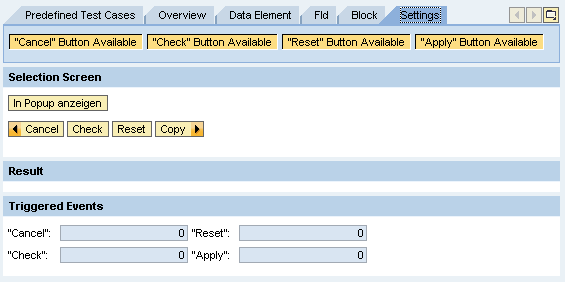
Four standard buttons are provided for the following functions:
-
Cancel settings
Terminates processing. System goes back to the last screen displayed in the application.
-
Reset
The content of all selection fields entered by the user is removed. The two methods RESET_SELECTION_FIELD (resets the range table of a selection field) and RESET_ALL_SELCTIONS_FIELDS (resets the range table of all selection fields) are provided on the interface for this.
-
Done
Processing is continued and the data entered is used. For example, if select options are used within a search help, the search is performed.
-
Check
A validation check is performed on the data input by the user. The interface method CHECK_ALL_SELECTION_FIELDS (checks that input of all selection fields is correct) is provided on the interface.
For canceling and copying the user must register for events in the WDR_SELECT_OPTIONS component. The user can then implement cancel and copy functions.
The event is triggered when the user clicks on one of these buttons. Note that this is valid only for the select options for freely defined input help and for the ABAP Dictionary input help, but not for OVS help.
You can hide one or all of these buttons by using SET_GLOBAL_OPTIONS, and specifying which standard buttons you do not want to set. You can also define your own buttons for individual functions.
Once you have deactivated the standard buttons, you can call the corresponding methods of the component interface or the helper class to trigger the actions in the source code.
The most important method is ADD_SELECTION_FIELD for the field in question.
The Select-Options component in Web Dynpro ABAP also supports the parameter fields known to the dynpro environment.
You can find an example in the system in component WDR_TEST_SELECT_OPTIONS.