PageLayout
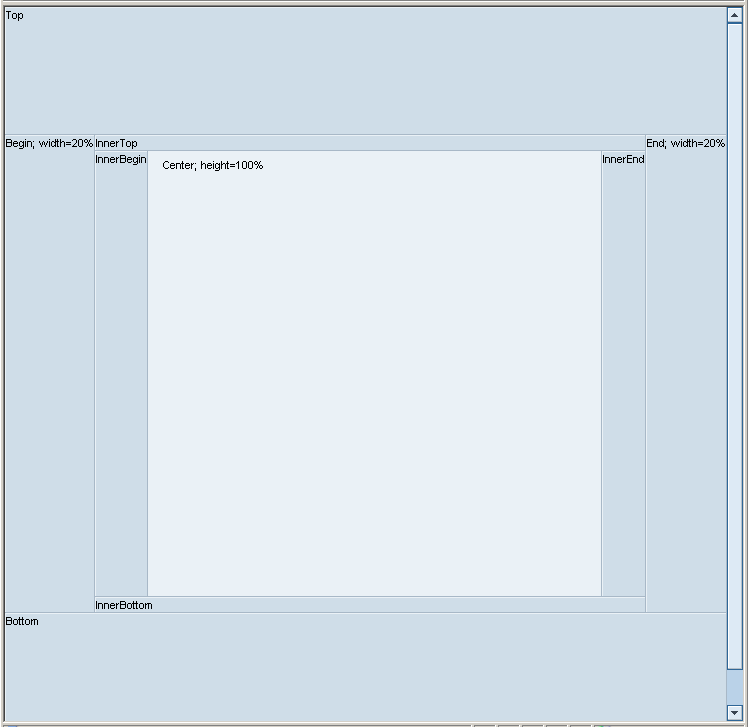
With PageLayout you can divide a page into several areas.The PageLayout must always be used as a root element of a view.It should only be used once in an application in the top view of the view hierarchy.
PageLayouts can contain up to nine areas. Each area or panel ( PagePanel ) can have a different background color and border.The width of a PageFullWidthPanel is always 100%.
Example of the Visual Display
| Runtime Class |
CL_WD_PAGE_LAYOUT |
Properties in the View Designer
| Name | Type | Initial Value | Bindable |
|---|---|---|---|
|
STRING |
(automatic) |
No |
Aggregations in the View Designer
| Name | Cardinality | Type |
|---|---|---|
|
0..1 |
||
|
0..1 |
||
|
0..1 |
||
|
0..1 |
||
|
0..1 |
||
|
0..1 |
||
|
0..1 |
||
|
0..1 |
||
|
0..1 |
Other properties that can be inherited are defined in the associated higher-level classes. The associated UI elements are:
For dynamic programming, the same properties, events, and aggregations as in the View Designer are available. Bear in mind the different spellings.
Dynamic Programming of Aggregations
| View Designer Name | Runtime Name | Cardinality |
|---|---|---|
|
BEGIN |
0..1 |
|
|
BOTTOM |
0..1 |
|
|
CENTER |
0..1 |
|
|
END |
0..1 |
|
|
INNER_BEGIN |
0..1 |
|
|
INNER_BOTTOM |
0..1 |
|
|
INNER_END |
0..1 |
|
|
INNER_TOP |
0..1 |
|
|
TOP |
0..1 |
You can find an example of this UI element in the system in the demo_uiel_page_layout Web Dynpro application (component DEMO_UIEL_PATTERN).