Example: Dragging a Characteristic to a Characteristic Value of Another Characteristic
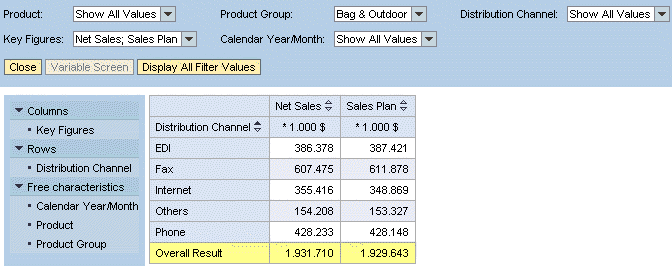
The net sales and planned sales for each product group are displayed in your analysis grid. You are interested in the product group Bag & Outdoor and want a breakdown of the sales data for each of its distribution channels.
Using drag and drop, drag the Distribution Channel characteristic from the navigation pane to the Bag & Outdoor characteristic in the analysis grid.

The analysis grid is updated accordingly: The Distribution Channelcharacteristic is in the drilldown and the sales data for each of the distribution channels used to sell the Bag & Outdoor products is displayed. As a result of the drag and drop action, the system filters the characteristic Product Group automatically to the characteristic value Bag & Outdoor. This information is displayed in the filter pane.