XML Validation
XML validation allows you to check the structure of a PI message payload. You activate the validation in the collaboration agreement or in the integrated configuration in the Integration Directory. Whenever a sender agreement, receiver agreement, or an integrated configuration with enabled XML validation is activated, the corresponding XSD for the sender or receiver interface is sent to the runtime and stored in the persistent cache. The cache is located on the central or de-central Advanced Adapter Engine. Monitoring and administration takes place in message monitoring of the Runtime Workbench and in the Integration Engine.
There is no semantic check of the message payload. Fault messages, receipt acknowledgments, and exceptions are not validated.
The parser cannot handle maxOccurs > 5.000. The IDoc type editor cannot handle definition unbounded. Runtime access to external links in xml.xsds is not possible.
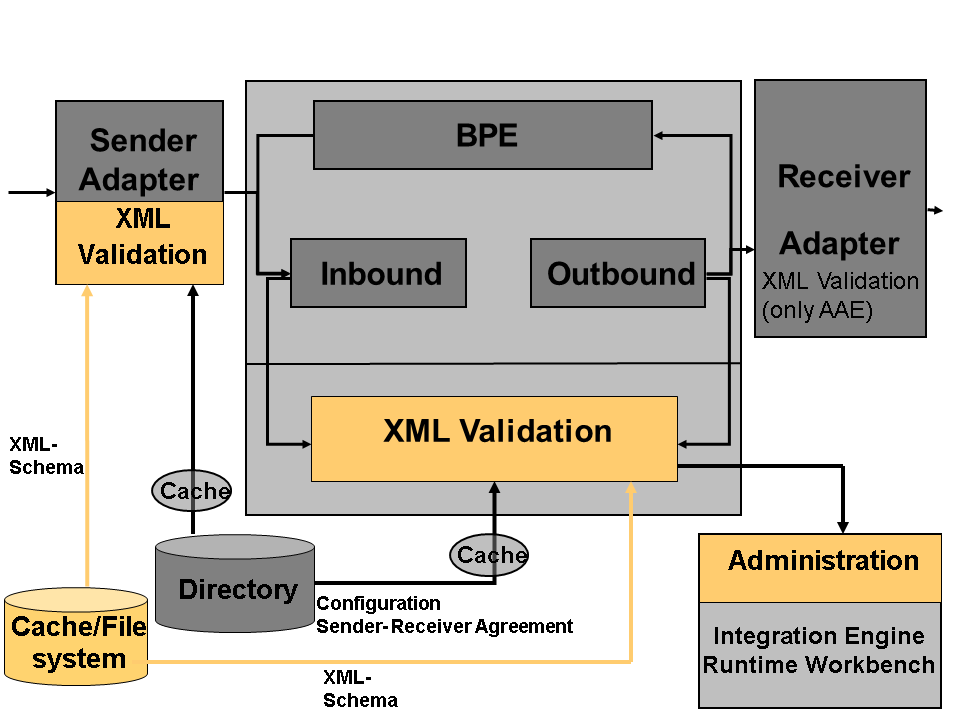
You can perform the structure check at the following points in PI message processing:
- Validation in the sender adapter
If the sender adapter has created the PI message, you can then perform the validation of the PI payload. If the structure of the payload differs from the definition of the data type provided for comparison, message processing is stopped. The adapter sends a synchronous response to the sender of the message, informing it about the structure error. The industry-specific adapters inform the sender asynchronously, as required by the RNIF protocol and the CIDX protocol.
All sender adapters (including non-SAP adapters) can perform this validation.
- Validation in the Integration Engine
In inbound and outbound processing, validation of the PI message payload takes place as a pipeline step of the Integration Engine. If the structure of the message payload does not match the saved definition of the data type, an error description is generated. The error description contains status information and a list of all structure errors. Message processing is stopped. The message is set to error status and an error report is saved.
- Validation in the integrated configuration
On the Inbound Processing tab of the Integrated Configuration, you can select validation at the adapter.
On the Outbound Processing tab of the Integrated Configuration you can select validation on the outbound direction. In this case, the validation is done after the interface determination and mapping.
For synchronous scenarios, the validation can be done both for the request and the response in the Advanced Adapter Engine.
Handling Synchronous Messages
Synchronous messages consist of a request and a response payload, which are processed in a synchronous call. Both payloads can only be validated together. You configure the validation for inbound requests and outbound responses in the sender agreement. You configure the validation for outbound requests and inbound responses in the receiver agreement. Synchronous messages can only be validated in the adapter, not in the Integration Engine.
Data Types from the Enterprise Services Repository
The data types that are used for validation come from the Enterprise Services Repository.
To update the cache after a change of information in the ES Repository that is used for XML validation, re-activate the collaboration agreement or integrated configuration in the Integration Directory.
Data types containing external references cannot be resolved at runtime. Do not use XSDs containing statements with maxOccurs > 5000. Use statement unbounded instead.
More information: Data Types
Configuration
You define whether and where the validation of the PI message payload takes place in the respective collaboration agreement. In a sender agreement, you can choose between validation in the sender adapter or validation in the Integration Engine. If validation takes place in the adapter, and the property xiadapter.stage.conf is set to (BI=1, MS=3), the message gets persisted in the Adapter Engine and the error message can be processed by the administrator in the Runtime Workbench in case of an error. By default the service property is set to MS=3 and in this case a synchronous response is sent to the sender when an error occurs.
For error handling it is recommended to set the service property to (BI=1, MS=3)(B1=1, MS=3, AM=3, VI=1, VO=1).
More information: Storing Message Versions on the Advanced Adapter Engine
In the receiver agreement, you can configure the validation in the Integration Engine. If validation takes place in the Integration Server, the message is set to error status and can be processed by the administrator in the Runtime Workbench in the case of an error.
More information: Receiver Agreement , Sender Agreement , Defining the Integrated Configuration
Administration in the Runtime Workbench and in the Integration Engine
Messages that have error status following validation can be processed further by an administrator in the Runtime Workbench. The administrator can resend messages and skip the validation step.
More information about monitoring in the Runtime Workbench: Displaying and Managing Messages
More information about monitoring in the Integration Engine: Selecting Processed XML Messages
Monitor the XSD schema in the Advanced Adapter Engine in SAP NetWeaver Adminsitrator → Cache Monitoring → Mapping Runtime.