TablePopin
Popins are insertions between the rows of a Table , which may refer to a row or individual cells. A popin can be linked to the table for a row popin and to the TableColumn for a cell popin. With a cell popin the associated cell is assigned the background color of the popin so that you can see that they belong together. The UI element TablePopinToggleCell is provided for expanding and collapsing the TablePopin.
TablePopinToggleCells should only be used for RowPopins and not for CellPopins.
The use of the Table UI element in the TablePopin and RowRepeater UI elements is not supported.
Examples of the Display
Row Popin
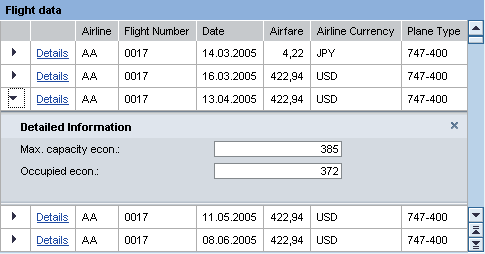
Cell Popin

One popin may exist for each row, otherwise any number of popins you like is permitted.
If a table can display more than one popin at a time, the popin must not contain a ViewContainerUIElement , as otherwise the same view could be displayed several times and this is not allowed. There would be no point in this anyway as the popins would display the same content several times
The content of a popin is implemented using the TextBar or any other UI element you like.
The Table.selectedPopin property controls whether and, if yes, which popin, is displayed for a row. The property must be linked to the data source of the table, if not a popin will appear in each row. The selectedPopin property contains the ID of the element, whose popin is to be displayed: Either the ID of the table for the row popin (Table.Popin) or the ID of the table column for a cell popin. If the value is set to initial, no popin is displayed for the row.
Popins should not be used for display the classical detailed list, as insertions make it difficult to navigate through the table. Instead popins should be used for additional information that is not needed permanently but should still be displayed near to the object.
Popins should be opened and closed by the application itself. A ToolbarButton is provided for row popins. For cell popins a LinkToAction for instance can be used as the TableCellEditor to open the popin. A popin already provides an event for the closing action. If the onClose-Event is linked to an action, the popin displays a close button that triggers the event when the user clicks on it.
The use of cell popins is not supported for TreeByKeyTableColumn and TreeByNestingTableColum.
Line popins on the other hand are integrated in the hierarchy for TreeByKeyTableColumn and TreeByNestingTableColum tables, which means they can be displayed and hidden by the expand and collapse button in the hierarchy.
| Runtime Class |
CL_WD_TABLE_POPIN |
| Name | Type | Initial Value | Bindable |
|---|---|---|---|
|
STRING |
(automatic) |
No |
|
|
Translatable text |
Yes |
||
|
WDUI_POPIN_DESIGN |
fill |
Yes |
|
|
WDY_BOOLEAN |
true |
Yes |
|
|
WDUI_TABLE_POPIN_TITLE_DESIGN |
text |
Yes |
|
|
Translatable text |
Yes |
Aggregations in the View Designer
Events in the View Designer
| Name |
|---|
Other properties that can be inherited are defined in the associated higher-level classes. The associated UI elements are:
For dynamic programming, the same properties, events, and aggregations as in the View Designer are available. Bear in mind the different spellings.
Dynamic Programming of Properties
| View Designer Name | Runtime Name | Type |
|---|---|---|
|
ACCESSIBILITY_DESCR |
WDY_MD_TRANSLATABLE_TEXT |
|
|
DESIGN |
WDUI_POPIN_DESIGN |
|
|
design: fill |
CL_WD_TABLE_POPIN=>E_DESIGN-FILL |
|
|
design: plain |
CL_WD_TABLE_POPIN=>E_DESIGN-PLAIN |
|
|
design: transparent |
CL_WD_TABLE_POPIN=>E_DESIGN-TRANSPARENT |
|
|
HAS_CONTENT_PADDING |
WDY_BOOLEAN |
|
|
TITLE_DESIGN |
WDUI_TABLE_POPIN_TITLE_DESIGN |
|
|
titleDesign: critical |
CL_WD_TABLE_POPIN=>E_TITLE_DESIGN-CRITICAL |
|
|
titleDesign: error |
CL_WD_TABLE_POPIN=>E_TITLE_DESIGN-ERROR |
|
|
titleDesign: ok |
CL_WD_TABLE_POPIN=>E_TITLE_DESIGN-OK |
|
|
titleDesign: text |
CL_WD_TABLE_POPIN=>E_TITLE_DESIGN-TEXT |
|
|
TITLE_TEXT |
WDY_MD_TRANSLATABLE_TEXT |
Dynamic Programming of Events
| View Designer Name | Runtime Name |
|---|---|
|
ON_CLOSE |
Dynamic Programming of Aggregations
In the example WDR_TEST_TABLE, the STRING attribute is used to identify the table row. If you do not want to use this because an additional attribute in the structure would mean the reference to the dictionary structure is lost, proceed as follows: Create a subnode for the node with the DDIC structure with the cardinality 1:1 and store the STRING attribute there.
You could also create a second DDIC structure containing the first structure and the additional field.