ESR Content Transports
Using ESR content transports you can transport Enterprise Services Repository (ES Repository) design objects from one repository to another. The following are the primary possible applications:
- You want to deliver objects from the ES Repository.
- You want to use an ES Repository for a development, whilst the development is to first be tested consolidated in follow-on systems. You will then later transport the tested status to a Productive Repository.
When you develop your applications you must differentiate between two types of development objects:
- Design objects from the ES Repository.
- Objects in the different application systems. These are for example Java and ABAP classes, client and server proxies generated using proxy generation and other development objects that implement the actual application logic.
The functions for transporting design and configuration objects described in this section can only be used to transport ES Repository objects. All objects that are developed in the application systems (proxy objects included) must be shipped using their infrastructure. In particular, you must ensure that the objects of your application from the ES Repository are shipped together with the objects of the application system.
More information for the organization and transport of Java development objects: Tasks .
A topic that is related to transports is that of release transfer (more information: Transferring Design Objects ). This involves the transfer of design objects of different software component versions within a single Enterprise Services Repository.
ES Repository objects have one original repository, in other words an ES Repository from which an object originates. Within an ES Repository you can differentiate between original objects and copies by using an attribute of the corresponding software component version.
Due to the originality principle, transport landscapes for ES Repositories are star-shaped:
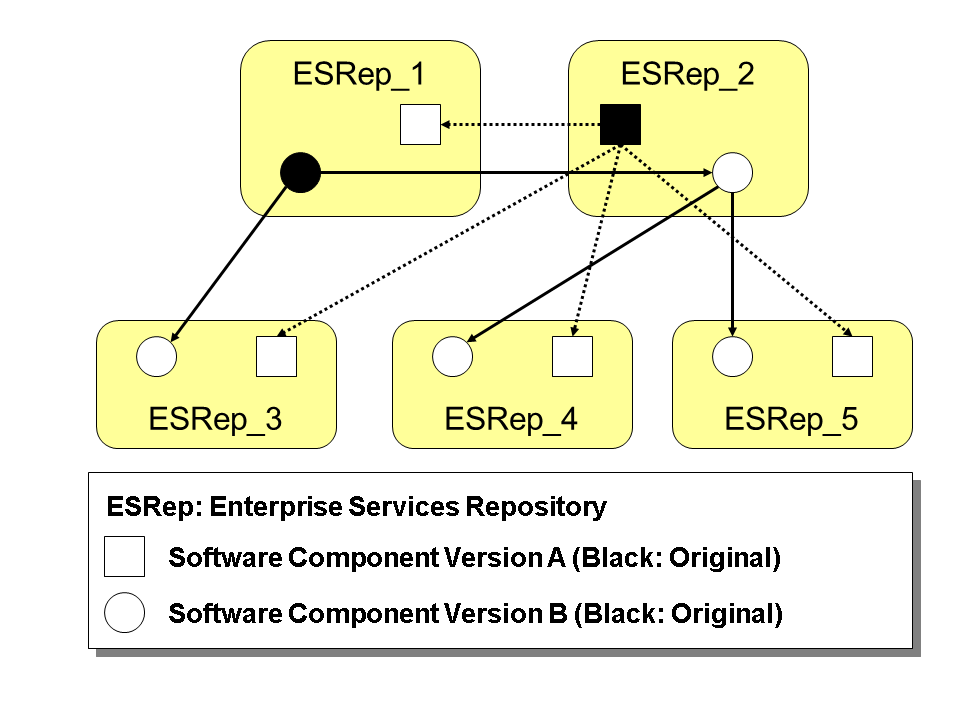
You must only make changes to an object in the ES Repository from which the object originates. The new versions of this object are then created when it is imported into the target Repository so that the object has the same version in both repositories (see figure):

As shown here, object versions in the various repositories are consistent. The following mechanisms ensure this:
- You should lock objects in the target repository against entries (see Object Properties in Software Component Versions ). Nevertheless, you do have the option of temporarily changing objects in the target repository, but this can lead to a conflict when you import the objects (see: Conflicts when Importing Objects ).
- When older object versions are imported to a target repository, any existing newer object versions are not overwritten. The older version being imported is visible in the object history following the import. The more recent version remains the current version.Note
This means that multiple imports into an ES repository can lead to the same end result, regardless of the sequence in which they are imported.
You can transport objects in the ES Builder in the following ways:
- The transport wizard (menu Tools → Export Configuration Objects). In the wizard you can select the mode for the export (CMS transport or file system).
- Transport using change lists. On the Change Lists tab page you can, using the context menu, release transportable change lists for a CMS transport. A file system-based export of a change list is not possible.
Options in the Transport Wizard
The ES Builder provides the following options in the transport wizard for the transport or export of design objects:
- When exporting the objects, you can restrict the object set exported, see below. You can only export active objects. If an object to be exported is not active, the last active version is exported.
- If an object has been deleted, a Delete Version is exported so that the target Repository deletes the object when it is imported. In exceptional cases, it may be necessary to deactivate the export of delete versions. Delete versions are exported if the Include Deleted Objects checkbox is selected.
- You can also simulate the export of objects. The export is not simulated if the Skip Preview checkbox is selected.
- If you use the file system for the transport, you exchange the import or export files by using a directory on either the client (local PC) or the server.
Limiting the Object Set
In the transport wizard you have the following options for selecting the objects to be exported:
Options in Step Select Objects
| Set of Objects | Further Options (Where Applicable) | Explanation of Option |
|---|---|---|
|
All objects of a software component version |
% |
|
|
Definition of Software Component Version and Namespace Only |
% |
|
|
All Objects of Individual Namespaces |
With Software Component Version Definition |
If selected, the definition of the software component version or the namespace definition is included in the export file. |
|
With Namespace Definition |
||
|
Single Objects The deleted objects have the Delete Version ( More information: Selecting Individual Objects |
Export a Folder With Content |
If selected, the entire contents of the folder (including content from sub folders) is exported. If not selected, only the folder definition is exported. |
|
Add Dependent Objects from Models |
If selected, any additional object types from models that are dependent on the following object types are automatically included in the export file: Filter, Templates, and Attribute Groups. |
|
|
With Software Component Version Definition |
If selected, the definition of the software component version or the namespace definition is included in the export file. |
|
|
With Namespace Definition |
 ) icon next to them in the selection list.
The export file also contains information about higher-level software components when exporting objects of a namespace, because the version of the software component of the object to be imported must be checked when you import.
If you have only exported the objects of one namespace, the namespaces of the same software component version are nevertheless visible in the target repository following the import. However, these namespaces are empty because they could not be exported. SAP recommends that you only export complete software component versions so as to avoid confusion.