Internationalization of XML Configuration
This section describes the various possibilities in which the UWL configuration can be internationalized.
UWL configuration contains several display texts like labels for buttons, names for Views etc. These text have to internationalized.
There are two alternatives for uploading the configuration to UWL.
- XML File
In this approach configuration XML file itself should contain all the description bundles through the definitions of < DescriptionBundles > and < Descriptions > tags for all the supported languages. (More information on the tags can be found in DTD Documentation .)
- ZIP File
In this approach, configuration zip is uploaded to UWL either through the administration or through the Business package deployment. Following requirements are to be met by the zip file.
- zip file name should be of the format uwl_myconfigName.zip where myconfigName is the configuration name
- zip file name is lowercase
- zip file should not contain any directories
- zip file should contain the xml file preferably by the name myconfigName.xml inside with no folder.
- zip file should contain resource bundles, that is, properties file which are translated. This resourceBundle name should be myconfigName, unless myconfigName contains "_". This character is reserved for language, country and variant resolution.
- ResourceBundle should contain keys with Long suffixed for tooltips.
NotemyconfigName is just a place holder. For example, for Manager Self Service (MSS) business package, use uwl_mss.zip with mss.xml, mss.properties, mss_de.properties etc. inside the file uwl_mss.zip.
Zip mechanism works through the Deployment hook also.
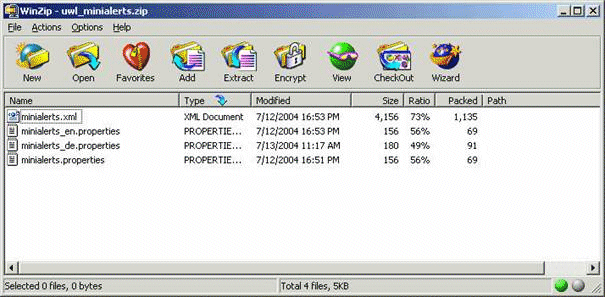
Following picture shows a sample zip file structure. Do note how all the points mentioned above are met.
Downloading the ZIP File
If zip file is used, they can be downloaded in the UWL administration UI:
-
Choose
 System Administration
  System Configuration Universal Worklist & Workflow Universal Worklist - Administration
  .
. -
Under Universal Worklist Content Configuration select the link Click here to ...
This link leads you to the XML files.
-
Go to the Upload New Configuration tab. Here you can also download zip files.
If zip file is loaded adapting to a system, then name of zip file as well as the XML file content inside are transformed as necessary.
How to Refer to the Resource Keys From Inside the XML
This concept is well understood by looking at the example.
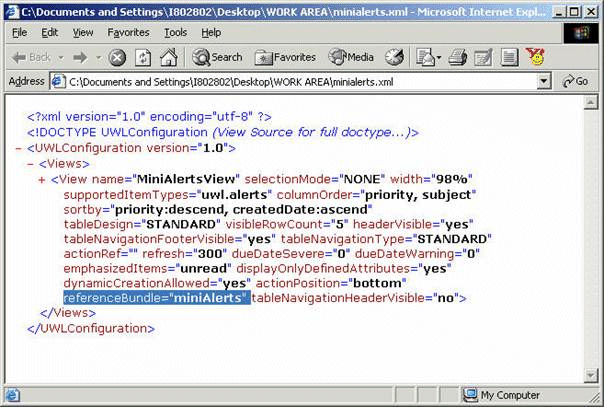
Following figure shows the view definition of minialerts.xml . View has referenceBundle as miniAlerts .
Following are the resource bundles present in this ZIP file:
-
Default properties
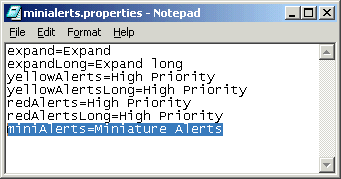
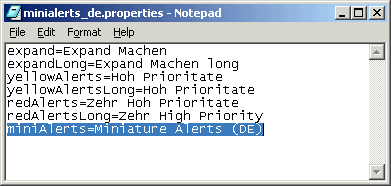
-
Properties file for German language