Replaying a Test Script in the Developer Studio
Test scripts that have been recorded in the Developer Studio can be replayed in the Developer Studio.
Replay View
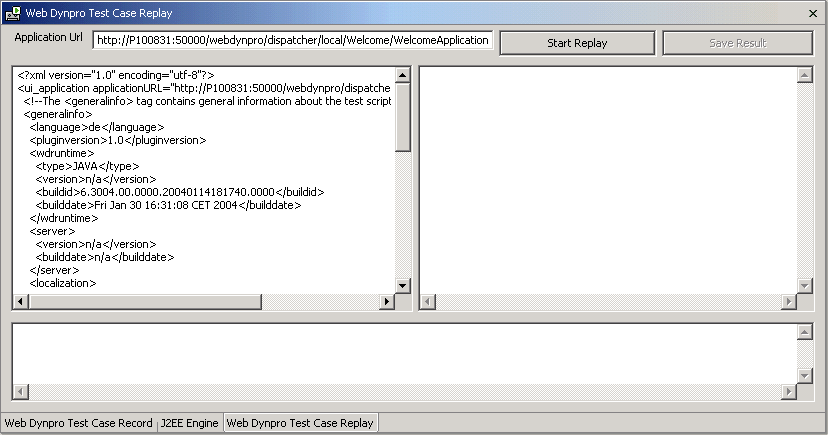
In the Application Url field, the default information is that recorded in the test script. You can change the information in this field.
In the upper-left text area, the test script is displayed. This is not the complete content of the test script - only what is used for replay. You can edit this information. The upper-right text area is where the result of the replay process is displayed.
The lower text area is where messages area displayed. Here, you get continuous feedback during the replay process.
The Web Dynpro project exists on the local machine.
The Web Dynpro application has been deployed and the SAP J2EE Engine preferences are correctly configured (Windows → Preferences → SAP J2EE Engine).
The Web Dynpro perspective is open.
- In the Web Dynpro Explorer, expand the project and select the test script.
- From the context menu, choose Replay.
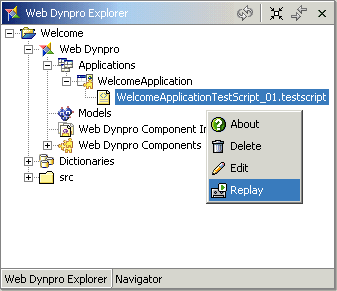 The Web Dynpro Test Case Replay
view appears.
The Web Dynpro Test Case Replay
view appears. - Make any required changes to the URL or test script.
- Choose Start Replay.
- If the application requires you to provide authentication, enter the required information in the dialog that appears.
- When the replay is finished, choose Save Result.
- In the dialog, enter the file name for the test results.
The file extension .testresult will be automatically added.
- Choose OK.
The new test script is stored as an XML file on the local file system. The test script is visible as a node under the relevant test script in the Web Dynpro Explorer.
