Electronic Signature
In some regulated industries, changes to data, formulas, and quality controls in the application require a complete audit trail of the changes and who made the changes. SAP xMII supports electronic signature and audit logging through the iCommand applet. This functionality enables end users to implement 21 CFR Part 11-compliant solutions. There are special settings in an iCommand applet display template for the following functions:
Primary check for credential and role verification
Secondary check for credential and role verification, if required
Full name verification, if required
Audit log of actions
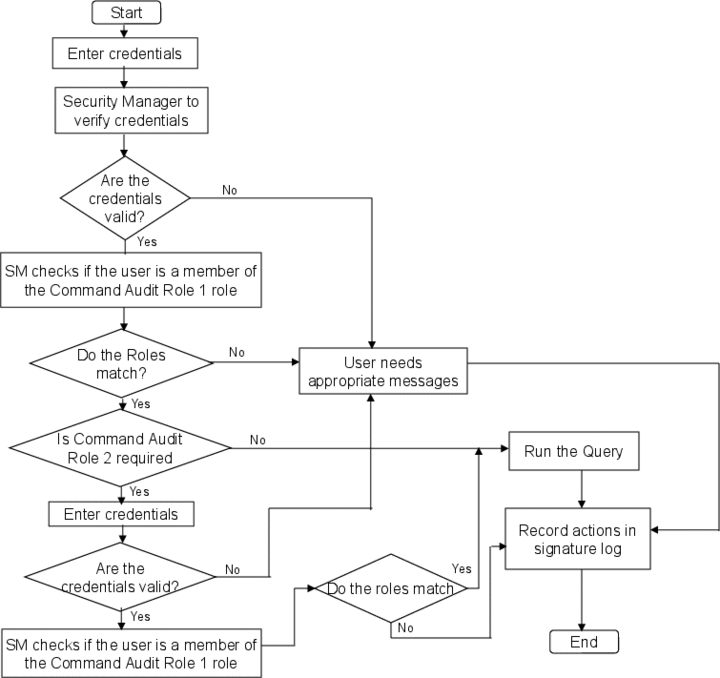
When you change data, the iCommand can be configured to prompt you for authentication. This first user prompt is defined as Command Audit Role 1
in the iCommand Display Template. You will be authorized as a member when the credentials are approved by Security Manager
. The changes to the data are logged along with the changes and the user who made the changes.
You can define your iCommand to prompt for additional users (For example, supervisor) user name and password. In this scenario, the security manager must verify the credentials. The first and the second user must pass through the validation for the changes to be logged. A log entry with both the prompts are written. The second user prompt is defined as Command Audit Role 2
in the iCommand Display Template.
In addition to the user name and password credentials, Command Audit Role 1
and Command Audit Role 2
can also validate a user’s full name. If full name confirmation is required in addition to login and password, a separate pop up window prompts the user for his or her full name. The full name must be validated against the user authentication system or the process does not continue.
Example
An example of the SAP xMII electronic signature capability in the iCommand is summarized in the following flow chart: