 Bubble Charts
Bubble chart is a type of chart that displays three dimensions of data.
Features
A bubble chart displays three dimensions of data. You can compare three variables simultaneously. One variable is the X-axis, the second is the Y-axis and the third represents the area size of the bubbles. The size of the bubbles represents the area or the width of the bubbles and is calculated using R= sqrt(Area of the circle/pi).
 Note
Note
Three values are required for each bubble. These values must follow the order: X-axis, Y-axis, and size value.
You can represent negative values in a bubble chart. By default, negative values are not displayed in the chart. You can format negative values using color coding format. The size of a negative bubble is based on absolute value but its data label show a negative value on the chart.
With Time Series, a bubble chart requires two value columns and the second value is the bubble size.
Configuring Charts in SAP MII
You can configure charts in SAP MII using the label and value columns. For details, see i5Chart Data Mapping. A bubble chart uses only one column in Label Column
and multiple values in Value Columns
. When you move the cursor over the circles, the bubble gets highlighted and a tool tip displays the label and values column values. You can choose the column to base the circle sizes
Example
The sample data considered is the same as mentioned in the Example
section of Line Charts
. The configurations are:
Value Columns:
ProductionQuality, EnergyConsumption, WaterConsumptionLabel Columns:
Region, Month, Plant
Considering the data mentioned in the table and the defined configurations, the following bubble chart displays the half yearly production quality of a country within a region. Here, ProductionQuality
represents X-axis, EnergyConsumption
represents Y-axis, and WaterConsumption
represents the area size of the bubbles.
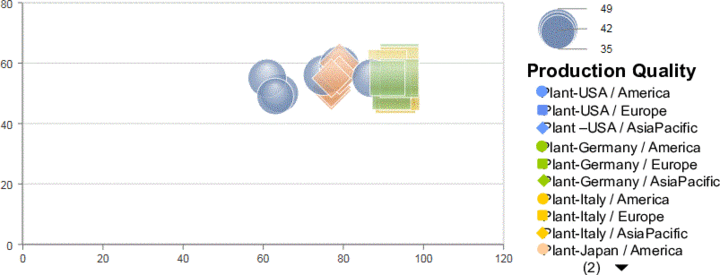
An example of bubble chart