Scatter Charts
Scatter charts use a set of individual dots on a two-dimensional chart. The position of each dot/point depends on the values of the variables on the X- and Y-axis.
Features
Scatter chart uses only one data set. The behavior of the scatter chart is based on the correlation of the two variables. If the dots are close to a straight line, the two variables have a high correlation. A trend line describes the positive, negative, or no correlation. In other words, in case of a positive trend, both the values increases simultaneously. A negative trend is indicated if the value of one variable increases, and the value of the other variable decreases. If the correlation is low, or zero, there is no trend.
Configuring Charts in SAP MII
You can configure charts in SAP MII using label and value columns. For details, see Data Mapping.
Example
The sample data considered is the same as mentioned in the Example
section of Line Charts
. The configurations are:
Value Columns:
ProductionQuality, EnergyConsumption, WaterConsumptionLabel Columns:
Region, Month, Plant
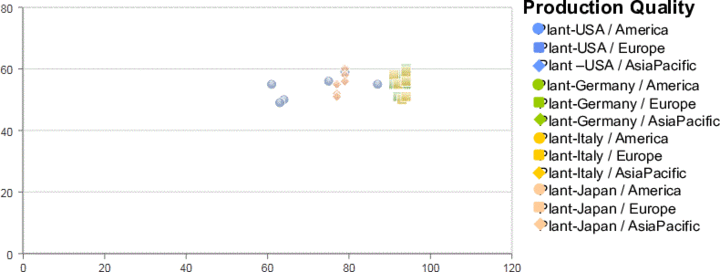
Considering the data mentioned in the table and the defined configurations, the following scatter chart displays the half yearly production quality of a country within a region.
 Note
Note
Only ProductionQuality and Region columns are considered to plot the chart.