 Enhanced Change and Transport System (CTS+)
Enhanced Change and Transport System (CTS+) is a tool to execute and monitor the transports from the SAP MII system to different systems. CTS+ is an extension of the existing Change and Transport System (CTS). You use this tool to organize, monitor and transport changes between SAP systems in your system landscape. You must create objects on the development system and attach them to a transport request that is distributed across your landscape using CTS+.
This document gives you basic information on setting up the CTS+ system on an SAP MII system and on choosing transport strategy. You need to select the configuration files from the Configurations
screen and export these from the SAP MII system to any CTS+ system.
For more information on Change and Transport System (CTS), see SAP Help portal at  http://help.sap.com

Application Lifecycle Mgmt
CTS Plug-In
CTS Plug-In 1.0.
 Change and Transport System - Overview (BC-CTS).
Integration
CTS ABAP system must be configured and available at the customer landscape.
Prerequisites
You have registered CTS+ as an RFC destination in SAP NetWeaver server. For more information, see Registering Enhanced Change and Transport System (CTS+).
Features
The CTS+ is used to manage the transports between development, test and productive systems. A representation must be created for each system of the application landscape. Transport routes are used to connect these systems in CTS+.
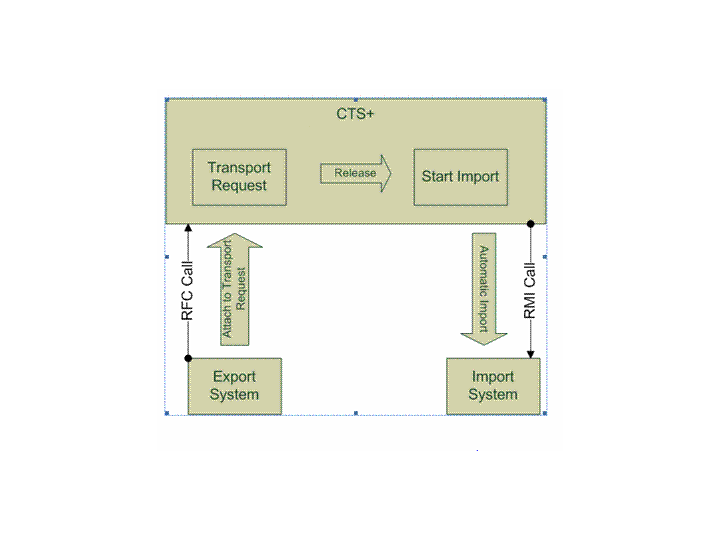
The following figure shows how CTS+ works with Java export and import systems:
Enhanced Change and Transport System (CTS+)
The Java export system gets the transport request from the CTS+ and attaches the objects to be exported. It then releases the transport request which is routed from the export system queue to the import system queue.
To import the transport request, you must release the request from the CTS+. This triggers the import and deployment of the transport request to the import system. No action is required from the SAP MII system for import.
 Note
Note
You cannot change recording for ABAP objects using the CTS+ tool.
Activities
To export the configuration files, do the following:
On the
SAP MII: Configurations
screen, select the configuration files.Choose
CTS+
in theExport Method
field.Enter brief descriptive text in the
Description
field.Choose
Export
.The selected configuration files are exported to CTS+.
To import the configuration files, see SAP Help portal at http://help.sap.com
Application Lifecycle Mgmt
Change and Transport System (Including CTS Plug-In)
CTS Plug-In 1.0
Change and Transport System - Overview (BC-CTS)
Transporting Non-ABAP Objects in Change and Transport System.