 OEE Calculations
OEE is a key performance indicator (KPI) that provides an insight into the efficiency of your manufacturing processes. It is a product of other manufacturing KPIs.
OEE = Availability X Performance X Quality
where,
Availability
: The ratio of amount of time a resource was actually productive to the amount of time the resource was available to be productive. The Availability KPI is derived from the granular elements such as Loading Time, Unscheduled Downtime, and Net Production Time.Performance
: The ratio of the actual speed with the designed speed. The Performance KPI is derived from granular elements such as Net Production Time, Speed Loss, and Net Operating Time.Quality
: The ratio of good product produced to the amount of total product produced. The Quality KPI is derived from the granular elements such as Net Operating Time, Quality Loss, and Value Operating Time.
OEE and its constituent KPIs are calculated using production or process order-operation data converted into terms of time.
SAP OEE application uses the basic elements, as shown in the following diagram, required for calculating OEE and its KPIs.
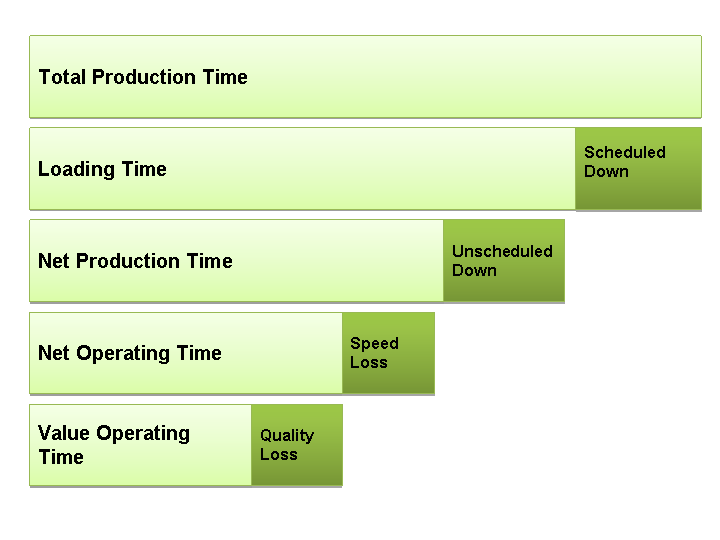
OEE Data Elements
OEE data elements are categorized into elements that are reported and elements that are derived from the reported elements. The elements can be defined as follows:
Total Production Time: This is a calculated element. It is the total time available considering 24 hours in a day and all seven days as working.
Flow Time: Flow time is the time taken between the start of an order and the first finished product. It is a reported element. Flow time is excluded from the loading time before the scheduled downs are considered.
If you want to consider flow time in OEE KPI calculations, configure a data collection element for flow time in the Customizing activity
Define Data Collection Element
in SAP ERP and transfer this to SAP MII. You can then report flow time when reporting downtimes from the OEE dashboard.Scheduled Down: This is a reported element. The OEE application considers the holidays maintained in the factory calendar and shift pattern definitions. Additional scheduled downtimes can be defined at the plant level from the SAP MII main menu

Worker UI Management

Scheduled Downtime Maintenance
 .
.Shift breaks are considered in OEE KPI calculations if you enable the
Use Shift Break
option while configuring the plant hierarchy.For more information, see Configuring Scheduled Downtime.
Loading Time: This is a calculated element. This is the time between the start and end of an order. In the SAP OEE application, the start and the end of the order is reported from the shop floor. The reported time excludes the durations of the scheduled downs. It also excludes the times when the order was on hold.
Unscheduled Down: This is a reported element. In the SAP OEE application it consists of all the unplanned downtimes reported from the shop floor. The unplanned downtimes effective in the downtime calculations are based on the line behavior and bottleneck behavior defined in your system.
For more information, see Configuring Customized Values
Net Production Time: This is a calculated element. It is the duration obtained after deducting the unscheduled downtimes from the loading time.
This element divided by the Loading Time is the Availability KPI and is a factor in calculating the OEE KPI.
Speed Loss: This is a reported element. It is the duration obtained after deducting the time that would have been required to produce the same quantity at nominal speed from the actual time taken to produce the reported production quantity. In the SAP OEE application, it is reported from the shop floor using the
Speed Loss
button on the OEE dashboard.Net Operating Time: This is a calculated element. It is duration obtained after deducting speed loss from the net production time. This element divided by the Net Production Time is the Performance KPI and is a factor in calculating the OEE KPI
Quality Loss: This is a reported element. It is the time taken to produce the rejected quantities, considering they were produced at nominal speed. In the SAP OEE application, this element is reported from the shop floor using the operator dashboard or automatically using Plant Connectivity (PCo).
Value Operating Time: This is a calculated element. It is the duration obtained after deducting quality loss from the net operating time. This element divided by the Net Operating Time is the Quality KPI and is a factor in calculating the OEE KPI.
For more information, see the documentation for the following Customizing activities in SAP ERP under Production
Overall Equipment Effectiveness
:
Define Data Element Types
Define Data Elements
Define Data Collection Contexts
Define Data Collection Elements
Define KPIs