 Line Charts
Line charts are simple charts that represent data as a series of points, in Cartesian coordinates, connected by a continuous line.
Features
A line chart can be used to visualize trends over a time interval. There are some significant lines depicting the limits other than the axes which are specification limits. You can define the upper, lower and ideal limits for particular data as specification limits.
Configuring Charts in SAP MII
You can configure charts in SAP MII using the label and value columns. For details, see Data Mapping. You can change the parameter values that you configured in the template through scripting (See Web Page Scripting for i5Charts). The Legend area displays the specification limits along with the defined colors. When you move the cursor over with lines, a tool tip displays the label and value column values along with specification limits.
For details about limits, see Specification Limits.
 Caution
SAP UI5 allows the specification limits for multiple label columns to display against each value column defined in the chart.
Example
Sample data returned from a query template is as follows:
Month | Plant | Region | Production Quality | Energy Consumption | Water Consumption |
|---|---|---|---|---|---|
Jan | Plant-USA | America | 61.00 | 55 | 41 |
Feb | Plant-USA | America | 64.00 | 50 | 44 |
Mar | Plant-USA | America | 63.00 | 49 | 39 |
Apr | Plant-USA | America | 75.00 | 56 | 47 |
May | Plant-USA | America | 87.00 | 55 | 41 |
Jun | Plant-USA | America | 79.00 | 59 | 47 |
Jan | Plant-Germany | Europe | 91.00 | 55 | 35 |
Feb | Plant-Germany | Europe | 92.00 | 51 | 41 |
Mar | Plant-Germany | Europe | 93.00 | 58 | 44 |
Apr | Plant-Germany | Europe | 94.00 | 56 | 49 |
May | Plant-Germany | Europe | 94.00 | 60 | 43 |
Jun | Plant-Germany | Europe | 94.00 | 55 | 41 |
Jan | Plant-Italy | Europe | 91.00 | 58 | 42 |
Feb | Plant-Italy | Europe | 92.00 | 55 | 45 |
Mar | Plant-Italy | Europe | 93.00 | 50 | 48 |
Apr | Plant-Italy | Europe | 94.00 | 56 | 43 |
May | Plant-Italy | Europe | 94.00 | 51 | 46 |
Jun | Plant-Italy | Europe | 94.00 | 59 | 43 |
Jan | Plant-Japan | AsiaPacific | 77.00 | 55 | 41 |
Feb | Plant-Japan | AsiaPacific | 79.00 | 60 | 45 |
Mar | Plant-Japan | AsiaPacific | 77.00 | 52 | 48 |
Apr | Plant-Japan | AsiaPacific | 79.00 | 58 | 46 |
May | Plant-Japan | AsiaPacific | 77.00 | 51 | 49 |
Jun | Plant-Japan | AsiaPacific | 79.00 | 56 | 43 |
The configurations defined are:
Label Columns: Region, Month, Plant
Value Columns: ProductionQuality, EnergyConsumption, WaterConsumption
Specification Limits and Colors: Upper Limit – 90 (Red), Center Line – 60 (Green), Lower Limit – 40 (Blue)
Considering the data mentioned in the table and the defined configurations, the following line chart displays the half yearly production quality, energy consumption, and water consumption of a country within a region.
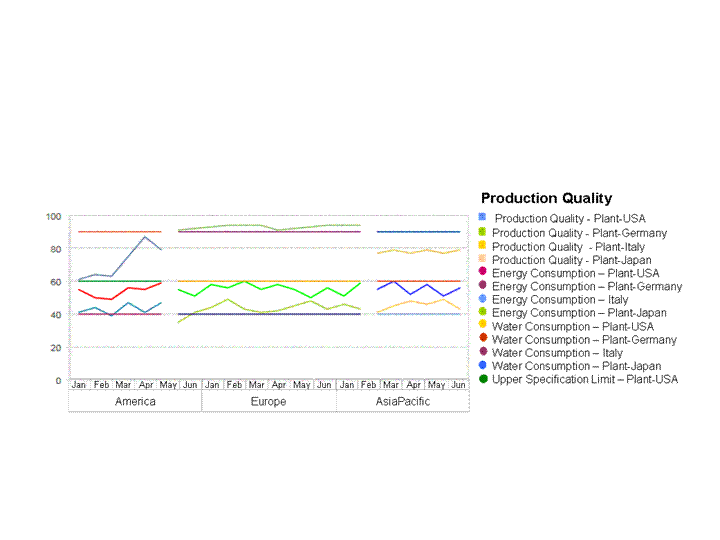
An example of line chart