 Interface to External Price Calculators
Use
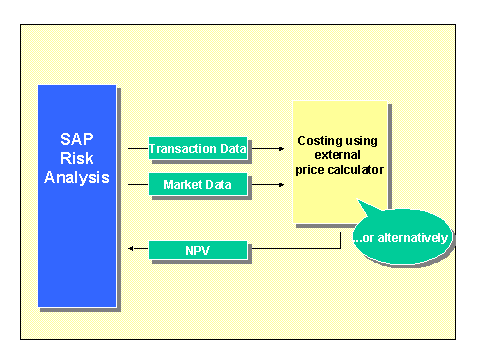
You can use an SAP interface to link external price calculators to the SAP System. This enables you to value transactions externally and then direct the valuation results back into the SAP System. You can do this in two different ways:
Method A: Valuation is done using external price calculators based on market and transaction data provided by the SAP system.
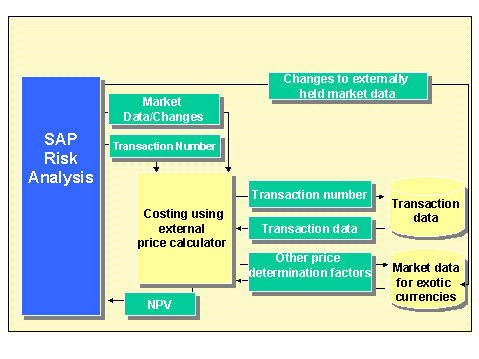
Method B: Valuation is done using external price calculators based on externally held market and/or transaction data. (These are referred to as fully external transactions)
 ( )
( )
The following can be identified as points in time, at which it is possible to branch to external functions:
T1: Risk factor analysis
The external price calculator must inform the SAP System which market data or risk factors are needed for the valuation.
T2: Valuation
Net present values and value at risk values are calculated by the external price calculator with the market data supplied by the SAP System.
The following programming languages are supported by the interface for the external price calculators:
ABAP
ABAP
Visual Basic 3.0
Excel 97 (via Visual Basic 4.0 for Applications )
All programming languages that can include the DLLS (dynamic link library).
Prerequisites
The RFC destination is defined in the SAP System. For more on this, see Displaying, maintaining and testing destinations . During the evaluation, the user has to check that the RFC server is running by checking the configuration of the relevant systems.
In order to externally value transactions in SAP (method A) you must activate external processing when you use the valuation rule specific settings on the detail screen to define the evaluation type. In the data group Control external functions you can also enter the RFC destination and the RFC function name for both the external analysis and the external valuation.
In order to transfer the valuation results of externally held transactions (method B) into the SAP System, you must supply the system with the transaction number as an anchor.
Activities for Creating an External Price Calculator
The SAP Banking Homepage includes a technical guide on connecting external price calculators with example programs under Media Center -> Literature. Customers and partners can download this guide as a zip file