 Convertible Bonds
Convertible bonds are issued by stock corporations. The investor has the right to swap the bond for a fixed quantity of the stock of the issuing corporation within a particular time limit.
The investor swaps the bond for stock if the value of the stock is greater than the nominal value of the bond. Convertible bonds can therefore be split into a bond and a call option on the underlying stock.
In order to valuate convertible bonds, you must create them as generic transactions.
Prerequisite
You have created the security classes for the bond and the stock in Treasury. A financial object exists for the bond.
 Note
Note
Ensure that you make an entry in the Nomin. per TU field in the basic data of the bond class. By doing so, you specify the amount of the nominal volume for which the option in the generic transaction is valid.
Procedure
To depict a convertible bond as a generic transaction, create the following elementary transaction hierarchy:
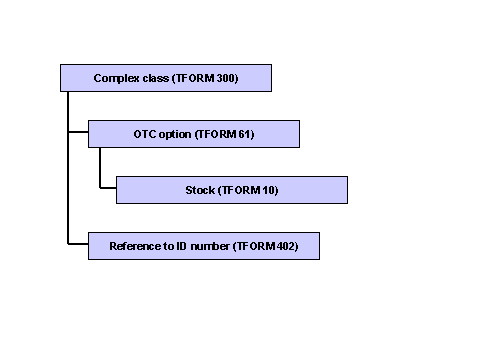
Create the hierarchy as follows: (The following depicts the transaction from the perspective of the investor.)
Create a new generic transaction with category 9 (class supplement). In the master data, enter the ID of the bond created in Treasury. See Editing Generic Transactions for the procedure.
.
In the dialog structure, select the first elementary transaction and assign to it transaction form 300 (complex class) .
The system displays a tab page.
Enter the issue date of the bond in the Start of term field.
Create a transaction with transaction form 402 (reference to ID number) under the Complex Class elementary transaction. To do this, select the Complex Class elementary transaction in the dialog structure and choose
 ( )
Create Elementary Trans.: Next Level
. Select the new elementary transaction and assign to it transaction form 402.
( )
Create Elementary Trans.: Next Level
. Select the new elementary transaction and assign to it transaction form 402.
The system displays a tab page.
Enter the object number of the bond in the ID Number field. You can use input help to select the transaction.
Create a transaction with transaction form 61 (OTC option) under the Complex Class elementary transaction. (Proceed as for step 3).
The system displays three tab pages.
Enter the following information on the Header Information tab page:
Start of term field.
Issue date of the bond
Notification By field
Due date of bond
Purchase/Sale field
Set the indicator to Purchase/Investment Made .
On the Options Information tab page, flag the option as a standard option with European exercise and, in particular, as a call option. Enter the following information:
Strike Currency field
Currency of the bond
Delivery of Underlying field
Due date of bond
Quotation of Underlying field
Direct quotation
You do not need to make any entries on the Cash Flow tab page.
Create a transaction with transaction form 10 (stock) under the OTC Option elementary transaction. (Proceed as for step 3).
The system displays the tab page for the header information.
Enter the security ID number, the exchange, enter Direct quotation quotation type, and enter the number of units. Flag the transaction as a spot transaction and a purchase.
Choose
 ( )
Back and then
( )
Back and then
 ( )
Save.
( )
Save.
Result
You have created the convertible bond as a generic transaction.
The system does not generate a financial object when you save even if automatic financial object integration is active. You have already created a financial object for the bond.
Example
Interest is calculated on a convertible bond for EUR 1,000 with 2%, which runs from 01/01/2002 to 01/01/2007. The bond class gives the owner of the bond the right to convert EUR 1,000 of the class into 20 units of company A’s stock at the end of the term. Company A’s stock has the security ID number 803200. The convertible bond has the security ID number 803260.
From the investor’s perspective, this class can be split into a bond with the corresponding interest and repayment structure, and the purchase of a call option. The call option is of the European exercise type, its term end is 01/01/2007, and its strike is EUR 1,000 for 20 units of stock.
The following tables contain the entries that you would have to make for the generic transaction and the elementary transactions for this example. As the generic transaction just references the bond, you do not need to enter the interest rate of 2% when you create the generic transaction.
Tab Page |
Field |
Example of Contents |
Comment |
|---|---|---|---|
Master Data |
ID Number |
803260 |
Security ID number of bond |
Master Data |
Short Name |
Convertible bond A. EUR 1000 |
Appropriate name for convertible bond |
Master Data |
Cat |
9 |
Generic transaction is class supplement. The system updates the position automatically using the underlying bond. The system accesses the extended class for evaluations. |
Tab Page |
Field |
Example of Contents |
Comment |
|---|---|---|---|
Header Information |
Start of Term |
07/17/2002 |
Issue date of the bond |
Tab Page |
Field |
Example of Contents |
Comment |
|---|---|---|---|
Header Information |
ID number |
803260 |
Security ID number of bond |
Tab Page |
Field |
Example of Contents |
Comment |
|---|---|---|---|
Header Information |
Start of term |
01/01/2002 |
Issue date of the bond |
Header Information |
Notification By |
01/01/2007 |
Due date of bond |
Header Information |
Purchase/Sale |
100 |
Purchase/Investment Made |
Options information |
Option Category |
1 |
Standard option |
Options Information |
Exercise Type |
1 |
European exercise type |
Options Information |
Put/Call Indicator |
2 |
Call, as the investor has the option of converting the bond to stock |
Options Information |
Strike Amount |
1,000 |
Nominal amount of bond |
Options Information |
Strike Currency |
EUR |
Currency of the bond |
Options Information |
Delivery of Underlying |
01/01/2007 |
Due date of bond |
Options Information |
Quotation of Underlying |
2 |
Direct quotation, as stock is quoted directly |
Tab Page |
Field |
Example of Contents |
Comment |
|---|---|---|---|
Header Information |
Spot/forward |
1 |
Spot transaction |
Header Information |
Purchase/Sale |
100 |
Purchase/investment |
Header Information |
Security ID Number |
803200 |
Security ID number of stock |
Header Information |
Exchange |
FFM |
Frankfurt am Main |
Header Information |
Quotation type |
2 |
Direct quotation |
Header Information |
Number of units |
20 |
Number of units of stock |
Note
The tab pages may also contain other fields. You do not need to make entries in fields that are not included in this table as they are not relevant for valuating the generic transaction.