 One-Touch Binary Options
A digital one-touch binary option pays out a fixed amount (the rebate) as soon as the agreed price limit (barrier) is reached.This can happen at any time within the term of the option.
This option category is always European as it is not possible to exercise the option early (the option pays out automatically the first time it is in-the-money).
In order to valuate a one-touch binary option, you must create it as a generic transaction.
Procedure
Create the following hierarchy of elementary transactions in order to depict digital options, such as one-touch binary options:
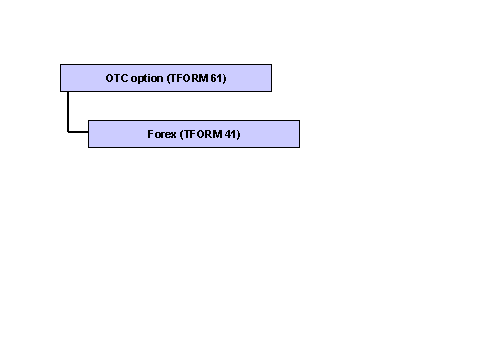
Create the hierarchy as follows:
Create a new generic transaction.See Edit Generic Transaction for the procedure.
In the dialog structure, select the first elementary transaction and assign to it transaction form 61 (OTC option).
The system displays three tab pages.
Enter the following information on the Header Information tab page:
Start of term field.
Issue date of the option
Notification By field
Due date of the option
Purchase/Sale field
Purchase transaction
Enter any commission, charges, or premium payments on the Cash Flow tab page.

Note that, in the case of fixed cash flows, such as commission, the plus/minus sign must be taken into account, but the Direction field can be empty.The Direction field is only of significance for variable cash flows.
Flag the option as a one-touch barrier option (call or put) with European-style exercise on the Options Information tab page. Enter the following information:
Put/Call Indicator field
Specify whether the option is a put or a call.
Strike Currency field
By entering the strike currency, you determine the currency of the option.You do not need to specify a strike.Instead, enter a barrier.
Barrier Rate 1 field
Enter the rate at which the option is exercised.
Create a transaction with
transaction form 41 (foreign exchange) under the
OTC Option
elementary transaction.To do this, select the
OTC Option
elementary transaction in the dialog structure and choose
 ( )
C
reate Elementary Trans.: Next Level
Select the new elementary transaction and assign to it transaction form 41.
( )
C
reate Elementary Trans.: Next Level
Select the new elementary transaction and assign to it transaction form 41.
The system displays two tab pages.
Enter the following information on the Header Information tab page:
Start of term field.
Start of term of option
Spot/forward field
Spot transaction
Purchase/Sale field
Purchase/investment
Nominal Amount and Currency fields
Nominal volume and currency of spot exchange transaction.
The nominal volume does not affect the NPV calculation of the option.For technical reasons you must however make an entry in this field.
Create two cash flows on the Cash Flow tab page:One outgoing purchase cash flow and one incoming purchase cash flow.Enter the following information for both cash flows:
Cash Flow Type field
Purchase cash flow
Note that “cash flow type” is a Customizing term and can therefore be changed.The value that you select here must be assigned to the Purchase Payment Cash Flow indicator.
Due Date field
Due date of the option
CF Amount field
Amount and currency of the cash flow in question
Direction field
Flag one cash flow as an outflow, and the other as an inflow.
Choose
 ( )
Back
and then
( )
Back
and then
 ( )
Save
( )
Save
Result
You have created a one-touch barrier option as a generic transaction.
Example
The start of the term of a one-touch barrier option is 03/01/2004 and the end of the term is 11/30/2004. A rate of 0.95 EUR/USD and a strike of 0.93 EUR/USD have been agreed.
Before you can create the option as a generic transaction, you must depict the barrier as a spot exchange transaction: The rate EUR 0.93 per USD is equivalent to the quotient 93,000,000 EUR divided by 100,000,000 USD.
The following tables contain the entries that you would have to make for the generic transaction and the elementary transactions for this example.
Tab Page |
Field |
Example of Contents |
Comment |
|---|---|---|---|
Master Data |
Short Name |
Barrier option |
Appropriate name for convertible bond |
Master Data |
Status |
0 |
Real generic transaction |
Tab Page |
Field |
Example of Contents |
Comment |
|---|---|---|---|
Header Information |
Start of Term |
03/01/2004 |
Start of term |
Header Information |
End of Term |
11/30/2004 |
Due date of option |
Header Information |
Purchase/Sale |
100 |
Purchase/investment |
Options Information |
Option Category |
61 |
Hit-at-the-end option |
Options Information |
Exercise Type |
1 |
European |
Options Information |
Put/Call Indicator |
2 |
Call, as option is agreed as digital up |
Options Information |
Strike Currency |
EUR |
Rebate currency |
Options Information |
Barrier Rate 1 |
0.95 |
Rate at which the option is exercised |
Tab Page |
Field |
Example of Contents |
Comment |
|---|---|---|---|
Header Information |
Start of Term |
11/30/2004 |
Due date of option |
Header Information |
Spot/Forward |
1 |
Spot transaction |
Header Information |
Nominal Amount |
93,000,000 |
Nominal volume of incoming cash flow |
Header Information |
Currency |
EUR |
Currency of incoming cash flow |
Cash Flow (incoming cash flow) |
Cash Flow Type |
06 |
Cash flow active |
Cash Flow (incoming cash flow) |
Cash Flow Amount |
93,000,000 |
Outgoing cash flow calculated from the strike |
Cash Flow (incoming cash flow) |
Currency |
EUR |
Currency of cash flow |
Cash Flow (incoming cash flow) |
Direction |
- |
Outflow |
Cash Flow (outgoing cash flow) |
Cash Flow Type |
06 |
Cash flow active |
Cash Flow (outgoing cash flow) |
Cash Flow Amount |
100,000,000 |
Incoming cash flow calculated from the strike |
Cash Flow (outgoing cash flow) |
Currency |
USD |
Currency of cash flow |
Cash Flow (outgoing cash flow) |
Direction |
+ |
Inflow |