 Depreciation Areas
You use depreciation areas to calculate different values in parallel for each fixed asset for different purposes. For example, you may require different types of values for the balance sheet than for cost accounting or tax purposes. You manage the depreciation terms and values necessary for this valuation in the depreciation areas of each asset. Since the system allows you to define up to 99 depreciation areas, you can manage many different types of valuation (in Asset Accounting Customizing under Valuation). Depreciation areas are grouped together, according to the requirements of a specific country or economic area, into a chart of depreciation.
Features
The depreciation areas are identified by two-digit numeric keys. You specify the asset-specific depreciation terms for every depreciation area belonging to the chart of depreciation. You enter the depreciation terms in the asset class or directly in the asset master record of the particular asset (see Asset Master Record). This makes it possible, for example, for you to use straight-line depreciation for your internal accounting purposes and use declining-balance depreciation for the balance sheet.
Account Determination from Within the Depreciation Area
You can post both the asset balance sheet values and the depreciation values from the individual depreciation areas to separate balance sheet accounts or income statement accounts in the general ledger. You specify the accounts individually in the account determination key for each depreciation area. You define the account determination key in Asset Accounting Customizing and specify the key in the particular asset class. For more information see Account Determination.
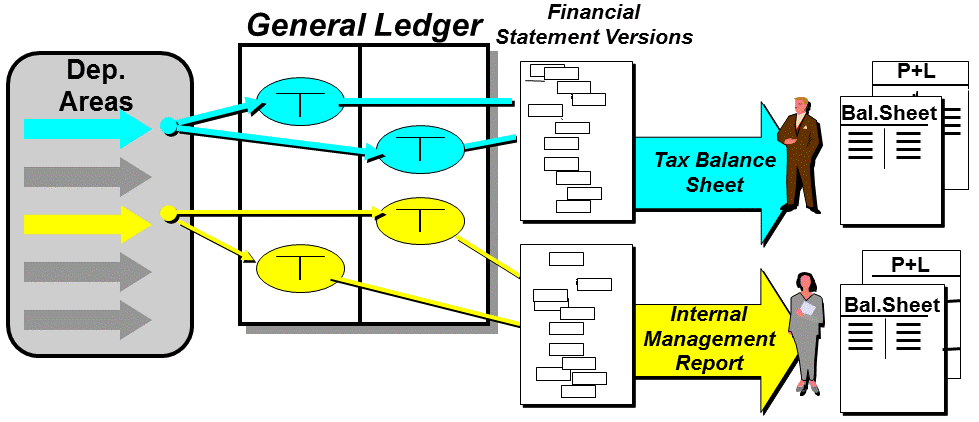
Figure: Account Determination from Within the Depreciation Area
Usually you need to post more than one depreciation area in parallel to the general ledger if you are creating different financial statement versions. For this purpose, you can define any number of financial statement versions for each chart of accounts in the general ledger. For each balance sheet account and income statement account, you specify in the financial statement version the balance sheet position or income statement position in which the account values should appear. You define financial statement versions in Customizing for Financial Accounting under  Financial Accounting
  General Ledger Accounting Closing Operations Document
  or under Financial Accounting (New) General Ledger Accounting (New) Periodic Processing Document .
Retained Earnings Account
The retained earnings account is an equity item in the balance sheet. This account shows the balance of all income statement accounts. If you are using different financial statement versions, then you also have to set up corresponding retained earnings accounts (in Customizing under Financial Accounting General Ledger Accounting G/L Accounts Create or under Financial Accounting (New) General Ledger Accounting (New) Master Data G/L Accounts G/L Account Creation and Processing ). The income statement account type controls which income statement accounts balance to which retained earnings accounts. You enter the income statement account type in the master record of the income statement accounts. When you enter a retained earnings account, enter the income statement account type that the retained earning account should balance to. You can also define new income statement account types here.
Creating Depreciation Areas
You should determine the types of valuation for which you need different depreciation areas before you implement Asset Accounting. Then adopt these areas from the SAP reference chart of depreciation, or copy existing depreciation areas and redefine them. You can delete any depreciation areas of the standard chart of depreciation that are not needed.
However, it is still possible to open new depreciation areas when the system is live.