 Scripting for Next Step Selection
This topic shows some examples of routings defined with scripting, with a description of their behaviors. The examples covered are the following:
-
Simple Test/Debug Loop
-
Failure-Dependent Routing
-
Using Custom Data Fields
Simple Test/Debug Loop
The following figure depicts a simple routing that starts with a TEST operation followed by either the SHIP or DEBUG step:
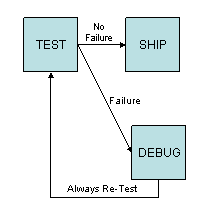
Note that the DEBUG step always returns to TEST for a retest.
The following table describes the script logic associated with the TEST step:
|
From/To Steps |
Script |
|---|---|
|
TEST to SHIP (No Failure) |
|
|
TEST to DEBUG (Failure) |
|
The other next steps have no scripts associated with them. Two possible scenarios with this routing are the following:
-
The SFC number passes the TEST and proceeds to SHIP.
-
The SFC number fails the TEST and is sent to DEBUG. The SFC number is repaired at DEBUG by adding a repair NC code. The SFC number is then sent back to TEST. It passes the TEST and is sent to SHIP.
Failure-Dependent Routing
The following figure depicts a routing that sends the failing SFC number to two different locations, depending on the NC_CODE:
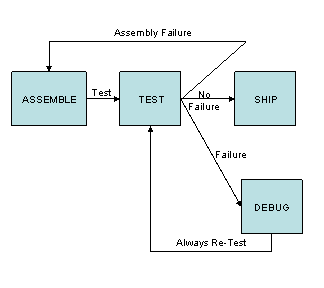
Note that the same thing can be done with the Failure ID associated with the NC_CODE.
The following table describes the script logic associated with the TEST next step:
|
From/To Steps |
Script |
|---|---|
|
TEST to SHIP (No Failure) |
|
|
TEST to DEBUG (Failure) |
|
|
TEST to ASSEMBLE (Assembly Failure) |
|
The other next steps have no scripts associated with them. The possible scenarios with this routing are the following:
-
The SFC number passes the TEST and proceeds to SHIP.
-
The SFC number fails the TEST with the MISSING_COMP NC Code and is sent to ASSEMBLE. The assembly problem is fixed on the SFC number and at ASSEMBLE. The SFC number is then sent back to TEST. It passes the TEST and is sent to SHIP.
-
The SFC number fails the TEST and is sent to DEBUG. The SFC number is repaired at DEBUG by adding a repair NC code. The SFC number is then sent back to TEST. It passes the TEST and is sent to SHIP.
Using Custom Data Fields
This routing uses the custom field associated with the SFC number's material to determine where to send the SFC number when it fails.

Failure-Dependent Routing Example
The script logic associated with the TEST next step is shown below:
|
From/To Steps |
Script |
|---|---|
|
TEST to SHIP (No Failure) |
|
|
TEST to DEBUG (Failure) |
// Get the custom property COST
// Default the cost to $100
// If the item is worth less than $500, go to DEBUG
|
|
TEST to MRB (High Value Failure) |
// Get the custom property COST
// Default the cost to $100
// If the item is worth more than $500, go to Material Review Board (MRB)
|
The two lengthier scripts for the failure cases illustrate how to retrieve data for objects in the system, including custom data fields.
The script for TEST to MRB is described below:
-
If there is no failure, then the SFC number should not follow the TEST to MRB path:
if (NC_CODE==null) exit(false); -
This statement gets the custom COST property for the material using the convenience method getCustomItemProperty():
cost=getCustomItemProperty("COST"); -
The next statement sets a default value for the material’s cost if COST is not defined:
if (cost==null) cost =100; -
The last statement includes the logic to decide whether to send the SFC number to MRB:
if (cost>=500) exit(true); else exit (false);
The size of the script is not limited, but longer scripts run slower.