 Integration of Production Orders
You can use this process to transfer the production order data between SAP ERP and SAP ME.
Prerequisites
See the following topics:
Process
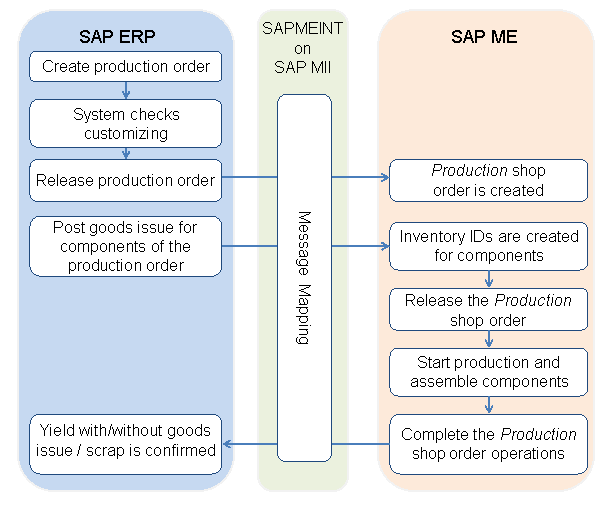
Integration with SAP ERP 6.05 with activated BF LOG_PP_MES_INT_01
Integration with SAP ERP 4.6c - 6.04 or 6.05 without activated BF LOG_PP_MES_INT_01
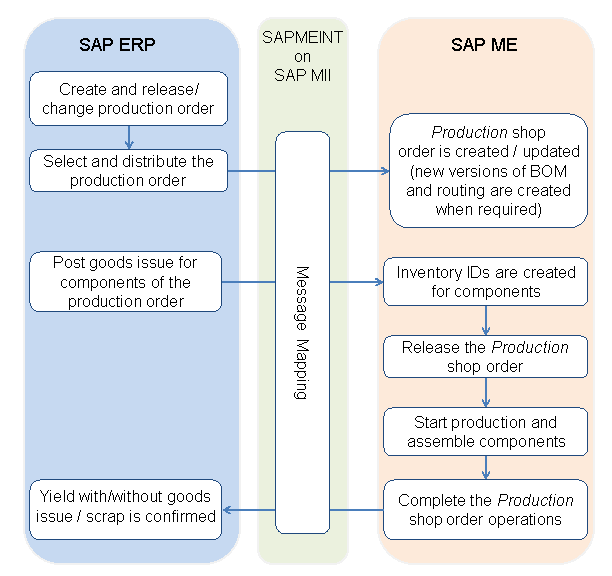
You create (transaction CO01) a production order in SAP ERP.
You transfer the production order (transaction POIT).
 Note
NoteSAP ERP 6.05 with activated business function (BF) LOG_PP_MES_INT_01 distributes production orders automatically upon release based on customizing settings.
End of the note.SAP ERP sends the production order IDoc message to SAP MII. Here message mapping takes place. SAPMEINT sends the production order data to SAP ME.
SAPMEINT creates the Production shop order based on the data received from SAP ERP (see Transfer of Production Order).
When required SAPMEINT creates new versions of BOM and/or routing (see Transfer of Bill of Material (BOM) and Transfer of Routing to Routing with Operations.
In SAP ERP, you post goods for the components of the production order.
SAPMEINT creates inventory IDs for the components to be consumed during the assembly (see Transfer of Inventory Data).
You release the shop order in SAP ME using Shop Order Release (see Shop Order Release).
You start production and assemble components.
When you do one of the following in SAP ME, the system triggers confirmation to SAP ERP:
An SFC number of the shop order is completed at an SAP ERP reporting step.
Pack a top-level SFC number of the Production shop order into a container and close it using Pack/Unpack.
When an SFC number is scrapped in SAP ME, the system triggers scrap confirmation to SAP ERP.
SAPMEINT sends the confirmation data to SAP ERP (see Transfer of Production Yield Confirmation and Transfer of Scrap Confirmation for Production Order).
The processing status of production orders, operations, and individual capacities are updated in SAP ERP.