
 Linking Equipment with iPPE Access Nodes

Use
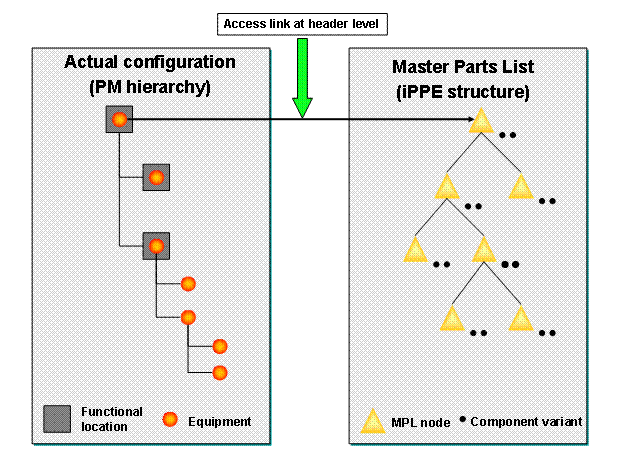
In the equipment master records, you must link the top equipment in the actual configuration to its counterpart iPPE access node in the master parts list. This equipment is used within the Configuration Control Workbench as reference equipment for the overall configuration check.
Prerequisite
You have maintained the actual configuration and the master parts list for the desired object.
Procedure
...
1. Choose Logistics → Plant Maintenance → Technical Objects → Equipment → Change from the SAP Easy Access screen.
2. Enter the desired piece of equipment.
3. On the Change Equipment: General Data screen, choose the Configuration Control tab page.
4.
The material that
requires an iPPE access is displayed in the Configuration group box.
The  Display pushbutton shows that there is
an individual configuration for the material. You can use this pushbutton to
display the configuration.
Display pushbutton shows that there is
an individual configuration for the material. You can use this pushbutton to
display the configuration.

If the material is a configurable material, you can define an individual configuration on the Conf. Data tab page.
5. Choose the desired iPPE access or change it in the iPPE Access Information group box. Choose the access that you have maintained in the corresponding iPPE product structure. The iPPE accesses that you can select should correspond to the materials, plant, and default use assigned in Customizing.
You can find the corresponding IMG activity in the Implementation Guide (IMG) under Plant Maintenance and Customer Service → Maintenance and Service Processing → Configuration Control → Make General Settings for Interface to iPPE Workbench.
6. Save your entries.
Result
The linked equipment can be used as reference equipment for the overall configuration check.
In the Configuration Control Workbench you can display the information for the iPPE access in the detailed view of the respective equipment.