
 Time Zone Support

Use
In today's distributed business environments, maintenance no longer takes place at one single location. The most important process steps in plant maintenance, such as planning, execution and confirmation, can be made in different locations, in different systems, with different business partners, and in different time zones.
You can use the time zone support functions to instantly switch from one time zone into another. This is advisable, for example, if you run plant maintenance processes that cross different time zones and you plan plant maintenance activities in a different location to where you perform or confirm plant maintenance activities.

On July 10, 2008 at 5:00 PM local time, a technician in Japan receives a call that an asset is not working. He or she creates a malfunction report in the system. The time zone in Japan is UTC +9. The system is in England therefore the system time zone is UTC. The system time zone in this case is 8:00 AM. When the malfunction report is created, it is 9:00 AM in Germany.
The technician in Japan enters the following data:
■ Task start: July 11, 2008 at 8:00 AM. Task end: July 11, 2008 at 10:00 AM.
■ Activity start: July 12, 2008 at 2:00 PM. Activity end: July 13, 2008 at 3:00 PM.
In Germany (Heidelberg UTC +1), a maintenance planner, who is responsible for planning in the APA region, monitors the list of notifications. Based on the notification list, he or she plans upcoming maintenance work. He or she selects the notification that was created in Japan, adds dates or times, or changes the task data and activity data.
Prerequisites
You have activated time zone support in Customizing for Plant Maintenance and Customer Service under Maintenance and Service Processing → Activate Time Zone Support for Application Areas.

When you activate this function, all previously saved times are interpreted as system time-zone times. They are converted into the user's reference time zone. This means that the times shown on the interface may have changed by a maximum of 24 hours. The data is not converted; only the interface data is converted.
If you deactivate the function in Customizing, times and dates are no longer converted. This means that they are displayed as they were saved (in the system time zone). We therefore recommend that you keep functions that have already been activated.
Features
The time zone support function can be used for the following objects:
● Notifications
● Orders
● Confirmations
● Measuring points
● Measurement documents
● Pieces of equipment
● Functional locations
● Revisions
● Structure lists
● Multilevel lists
● Serial number history
Time zone support is also taken into account when printing PDF-based shop papers.
The following time zones are used:
● Reference time zone
Time zone that is used in the current transaction. The reference time zone is always available/visible. You can change the reference time zone in the time-zone dialog box. When you change the reference time zone, the change is valid until the transaction is closed (internal session). The reference time zone is displayed in the time-zone dialog box, or is displayed as text on the time-zone button.
● Session time zone
Time zone that is valid for the period from when a user logs on to the SAP system until this user logs off (external session). When you start a new internal session, the session time zone is the default for the reference time zone.
● Personal time zone
Time zone that is assigned to a user in Customizing or in the user profile (transaction SU3). The personal time zone is the default for the reference time zone if you have not specified a session time zone.
The following diagram shows the different time zones in different countries and the conversion of the basic start time for an order into the different time zones:
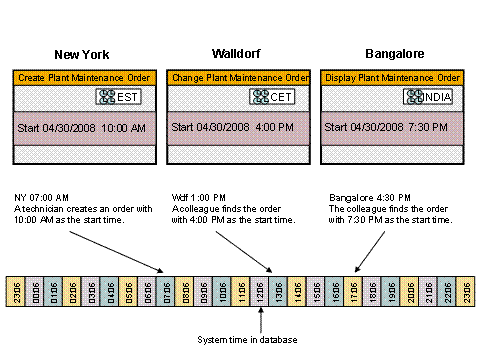
A technician creates a maintenance order at 7:00 AM in New York. The basic start time of this order is 10:00 AM. The system converts the basic start time to 4:00 PM for the colleague in Walldorf, who accesses the order at 1 p.m. local time. The system converts the basic start time to 7:30 PM for the colleague in Bangalore, who accesses the order at 4:30 PM local time.
Time zone support isnot provided in the following areas, meaning that the times are displayed as they are saved in the database:
● Action log
● Change documents
● Change documents for status
● Print of shop papers in SAPscript format
● Plant maintenance work centers
● Archive data
● Plant maintenance information system
● Cost reports
Since time zone support is not provided in plant maintenance work centers, you must use the system time for the work start time and work end time.
Activities
You make your own
settings in the relevant objects by setting the pushbutton  Time Zone <Selected Time
Zone>. A dialog box
appears in which we recommend the following settings:
Time Zone <Selected Time
Zone>. A dialog box
appears in which we recommend the following settings:
● Set the time zone that you are physically in as your personal time zone.
● Set the session time zone if you are responsible for another time zone for longer periods of time.
● Set the reference time zone if you want to change a time zone for a short period of time.
You can also reset the time zones to the personal time zone or the session time zone.