Determining the Valid Dunning Procedure
Use
The dunning procedure defines the criteria according to which an account or open item is to undergo dunning. If you are to undertake different dunning procedures in a company code (e.g. private-legal and public-legal) the dunning area also plays a role in addition to the dunning procedure.
Features
If an overdue item is to undergo dunning, the program first tries to determine the dunning area from the request.
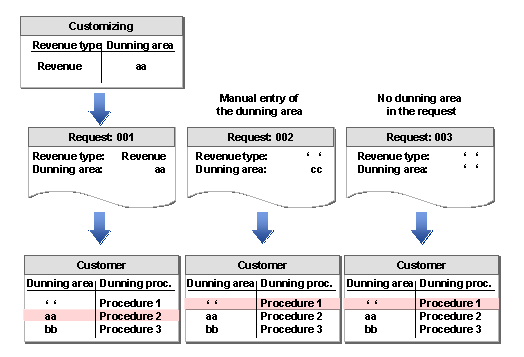
If there is a dunning areaentered in the request, the system checks if this dunning area is entered in the customer master record or the vendor master record and uses the dunning procedure that is assigned to this dunning area. If it does not find this dunning area in the customer or vendor master record, it uses the dunning procedure that is assigned to the dunning area "empty".
If there is nodunning area entered then the dunning procedure assigned to the dunning area "empty" is likewise used.
How does the dunning area get into the request?
You assign a revenue type to an account in the request to which you have assigned a dunning area in Customizing. The program automatically derives the dunning area.

The dunning area, which the program takes from Customizing, can be overwritten when entering a request.
You do not assign a revenue type to an account in the request. However, you enter the dunning area in the request manually.
If in Funds Management Government Customizing you have specified that dunning interest and dunning charges should be posted, then the program assumes the dunning area of the documents being processed when creating the respective requests. This ensures that dunning interest and dunning charges for the ensuing dunning runs are dunned with the documents from which they came.
If you don’t want to proceed this way and would prefer the program to derive the dunning area from the revenue type that you entered for the posting of the dunning charge/dunning interest in Customizing, you can program this to happen using the Business Transaction Event, event "00103020" (dunning interest) or event "00103025" (dunning charge).
How does the dunning area get into the customer master record?
You only enter the dunning data, that is a dunning procedure without dunning area in the customer or vendor master record. In this case, the dunning area "Empty" is saved for this customer or vendor. After you have maintained the dunning data, you can assign dunning areas manually.
You use program RFFMKWDO, which supplements selected customer or vendor data with entries for the combination company code/dunning area/dunning procedure. For more information, see the SAP menu under Accounting → Public Sector Management → Funds Management → Posting → Tools → Cash Desk → Update Dunning Procedure/Dunning Area in the program documentation.
You can update these entries with program RFFKWD1.
Which dunning procedure does the program use?
Ideally, there is an entry for the dunning area in the customer master record, which was set in the request. The program then uses the dunning procedure that is assigned to this dunning area.
If no entry exists from the request in the customer master record, then dunning takes place using the procedure for the dunning area "empty".

If the dunning data was not maintained for a customer, the program cannot execute the dunning.
The following graphic illustrates the determination of the dunning procedure as described above: