 FI Funds Management Payment Matching
Purpose
This procedure allows you to compare the changes in your bank and bank clearing accounts (documents in which commitment items with financial transaction 90 or 80 (bank) were posted to) with the updated payments in Fund Management. Transfers within these accounts are not considered. The graphic illustrates this principle:
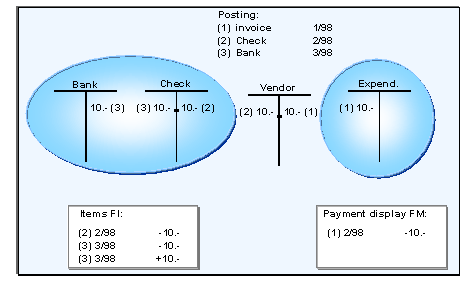 ( )
( )
The payment match checks whether all payment documents of Financial Accounting (FI) have been updated with the corresponding amount and date in Funds Management (FM).
A comparison of this data is only necessary if you are working on a payment basis and want to ensure an exact correspondence between financial accounting and Funds Management.
To execute the payment match, you can use program Payment Match at Document Level (RFFMRC07), which compares the data at line item level.
Prerequisites
The payment match must be activated in step Define Settings for the Payment Transfer in the Customizing of Funds Management Government .
All postings that lead to a change in monetary holdings must have been transferred into Funds Management.
To do this, you can use the program Enhanced Function for Payment Selection (RFFMS200).
For more information on the payment selection, see the program documentation under Payment Selection .
 ( )
( )
Note that for an active payment matching, each payment must be transferred into Funds Management at least once with its FI posting date. You should therefore execute the payment selection before each period end or the period-based commitment update.
To achieve good performance with the payment selection, you should execute the payment selection each working day.
You must also consider that the financial accounting data and Funds Management data only match if other conditions, with regard to system setting and user activities, have been fulfilled. Otherwise, variances will occur which the program will display accordingly. For more information, see Payment Match Prerequisites and SAP notes 123950 and 360667.
Process Flow
You execute the payment match with program RFFMRC07 at line item level. This program compares account movements on the bank accounts and bank clearing accounts of Financial Accounting (table BSEG) with the data in Funds Management (table FMFIIT). The program uses the entry date for document selection. The posting date for payments is not matched.
- ( )
Note for German Government customers: If you execute day-end closing in your system, the program uses the Posting day when selecting FI documents.
The result of the match is written in a work list that can be displayed and maintained using program Results List of the Payment Match (RFFMSD07).
In order to analyze errors displayed, you can use the program Document Analysis Activated/Deactivated in FM (RFFMS007) to activate the analysis of the FM documents in the FI document display (transaction FB03). You can display per document which commitment items and which financial transactions were addressed when posting and from which assignments the FM account assignments were derived.
Payment Matching
 ( )
( )