 Example: Authorization Checks for Budget Entry
Note that the following example applies to Former Budgeting of Funds Management.
The following scenario represents the sequence of authorization checks on the part of the system using “Enter budget” transaction as an example.
The authorization checks are always executed in relation to the entries you have made. If the user authorization is sufficient, the instructions are carried out or rejected by the system if the authorization is not adequate.
Process Flow
The authorization check of budget entry is divided into the following sub-steps:
FM area authorization
It first checks whether the user has authorization forthe FM area.
Budget version authorization
Then it checks whether the user has authorization forthe budget version used. If the user does not have authorization, the check is terminated and processing is refused.
Funds Management account assignment authorization
If the authorization group is maintained for FM account assignments, then the authorization check of the respective FM account assignments is carried out, that is, of the combination of FM area/commitment item/funds center/fund. If the user has this authorization, all other authorization checks are skipped and the instructions are carried out.
Authorization for individual FM account assignment elements.
If the authorization check is not maintained for the FM account assignment, the individual checks of the FM account assignment elements are carried out in the order fund, funds center and commitment item.
In the authorization check for the funds center, the system first checks the general authorization, then the cross and internal authorization check.
The diagram shows the case where the FM account assignment check is maintained for a user. No checks are carried out after the authorization checks for FM area, budget versions and FM account assignments and the system allows and executes budget entry.
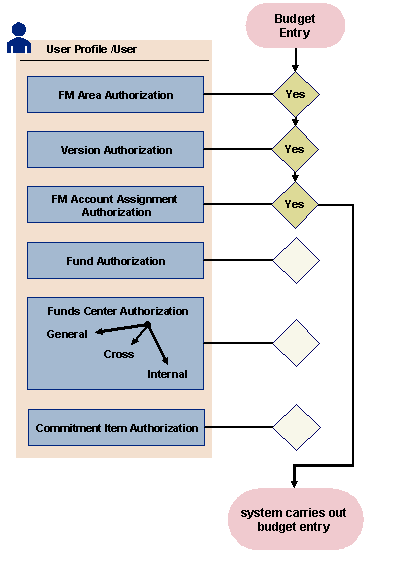
Figure: Authorization Check for Budget Entry
See also: