 Clearing Process for Payment Directives
Use
You can carry out clearingfor payment directives a fter you have completed the process of posting an invoice, a payment directive, and a payment. You will then have the following situation for a vendor account, for example:

Prerequisites
Features
For the FM update , you must have an alternative reconciliation accountcontaining a commitment item with financial transaction 80.
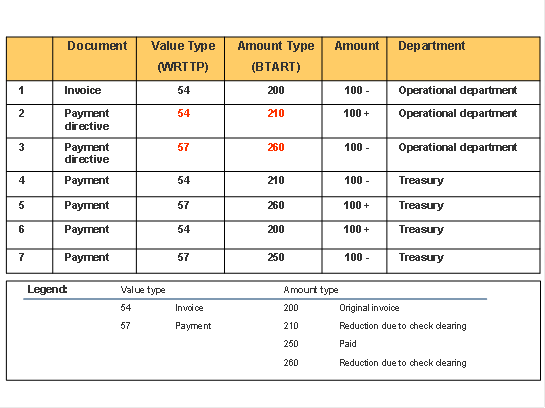
FM update scheme for payment directives:
In order to be able to carry out the overall posting scenario (invoice - payment directive - payment - clearing of open items), you must specify the following:
which items are blocked for payment, so that they are not paid by either manual or automatic payment
how is this realized technically: there is a business transaction eventthat carries this out automatically for the user.
ProcessFlow
For postings in Financial Accounting, the following information applies:
The relationship of invoice to payment directive is 1 – n.
The open items on the vendor account are cleared via program SAPF124 (Automatic Clearing without Definition of Clearing Currency) and not by transaction FMPO itself.
You can customize the alternative reconciliation accountso that it is available for payment directives by using a commitment item with financial transaction 80.
Funds Management is updated (see update profile) as follows:
You can see the document update in transaction F873 Display Payment Request . This update creates FM documents with a specific value type and amount type (see above diagram).
This information can be found in table FMIFIIT.
Invoices that come from Financials and Logistics can be processed using transaction FMPO Create Payment Directive .
 Caution
Note that there is no updating of the budgetary ledger for payment directives. Furthermore, there is no availability control (AVC) for payment directives, since a payment directive does not have any budget address information.
End of the caution.
Activities
In order to clear your payment directives, proceed as follows:
Call up programSAPF124 (transaction F.13) on Automatic Clearing via the main menu
 Accounting
 Financial Accounting
General Ledger
Periodic Processing
Automatic Clearing without Specification of Clearing Currency
Financial Accounting
General Ledger
Periodic Processing
Automatic Clearing without Specification of Clearing Currency  .
.
Read the corresponding online documentation and run the program.
The payment directives have been cleared.
In order to display them, see Displaying Payment Directive Data .