 Routing
A representation of how you process work on your floor. Typically, a routing is made up of a series of operations, also called routing steps. However a routing may include other steps, such as Hold
or Scrap
, or other routings.
Structure
Routings can have the following attributes:
Version
Routing Type
Status
Current Version
Tabular Routing
Relaxed Routing Flow
(see Relaxed Routing Flow and Shop Order ID)Document
Disposition Group
Step ID
Operation
(see Operation)Work Center
(see Work Center)Step Type
(Tabular Routing only)Required Time In Process
For more information, see Routing Maintenance.
You can create and maintain routings in the following modes:
Graphical
In a graphical mode, all the operations you have created are displayed in a tree list on the left of the screen. You create a routing by first dragging the operations onto the drawing area, and then connecting them with lines that represent the flow of work.
Tabular
In tabular mode, the sequence of operations is displayed in the table. You create a routing by inserting the new table records representing the routing steps. You can further add new and remove the existing operations as well as change their order.
Routing Types
On the Main
tab page in Routing Maintenance
, you use the Routing Type
field to classify each routing as follows:
Production
NC
Special
Disposition Function
SFC-Specific
Sample
 Note
Note
In NC Code Maintenance
, the Disposition Routing
tab includes all routings defined with the NC Routing
and Special Routing
type. The Disposition Function Routing
type in Routing Maintenance
is used by the system to define disposition functions (see Disposition Functions).
While Production
routings represent your manufacturing processes, such as building a printer, Special
and NC
routings represent how you handle exceptions, such as a printer’s failure of a functional test. The purpose of a Special
and NC
routings is to process nonconformed SFC numbers sent to the routing from a step on another routing.
In addition to operations, Any Order Groups
, and Simultaneous Groups
, Routing Maintenance
provides the following elements you can add to your Special
and NC
routings:
Hold
stepsScrapped
stepsDone
stepsReturn
steps
Return
steps include returning to the following:
The step on the routing where the SFC number originally came from
Any other step
The previous step
Any other previous step
The next step on the routing where the SFC number originally came from
These steps are helpful when you create Special
and NC
routings.
See also: Routing and Child Tables
Nested Routings
You can use a nested routing as a step on your Production
routing.
Note
The routing being created must not have itself as a nested routing otherwise the SFC number will be in a continuous loop.
Returning from a nested routing differs from returning from a pulled Special
routing or from a Disposition
routing. The following table describes the differences from the standard return:
Return To | Special Routing and Disposition Routing | Nested Routing |
|---|---|---|
| Returns to original operation step | Treated as |
| Returns to steps after the original step | Returns to steps after the original step |
| Returns to steps immediately before the original step where the SFC number has already been processed. Under rare conditions, this may be multiple steps. For example, when the routing has 2 or more paths to the original step and the SFC number has been processed on both of those paths. | Returns to steps after the original step |
| Returns to any steps before the original step where the SFC number has already been processed | Returns to steps after the original step |
| Returns to any step on the routing | Returns to steps after the original step |
For more information, see Layering Routings.
Integration
In addition to the linear steps on a routing, you need to indicate where units go when exceptions occur, such as failing a test step on a routing.
This situation creates the possibility of multiple next steps at a point on the routing. For example, at a TEST
step, if a unit passes the test, it is sent to the PACK
step. If the unit fails the test, it is sent to the ANALYSIS
step to determine why it failed the test.
There are two ways you can handle multiple next steps:
SAP ME ERP Integration
If you use the SAPMEINT component, see Transfer of Routing.
Example
An operator at the TEST
step on RTR1
logs an NC code against an SFC number. This action causes the system to automatically send the SFC number to the first step on the NC
routing, RTR2
. When the SFC number completes the last step on RTR2
, the system sends the SFC number back to the TEST
step on RTR1
.
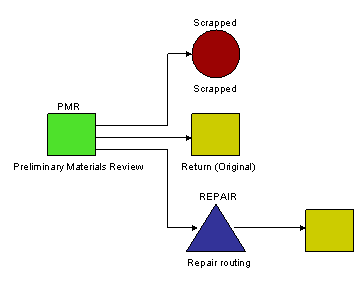
Following is a Special
routing named PMR
. PMR
is also the name of the first step on the routing. Because PMR
is a Special
routing, SFC numbers are never released to its first step. SFC numbers are never released to the first step on Special
routings or NC
routings. Instead, the system sends an SFC number to PMR
only when an operator or machine on another routing logs an NC against the SFC number.
Because the nonconformance indicates that something is wrong with the SFC number, the operator at the PMR
step is to determine the condition of the SFC number. When this operator completes the SFC number, the system displays a list of the possible next steps for the SFC number. The operator determines whether to scrap the SFC number, send it back to the original step it came from for retesting, or send it to a repair routing. In this case, the repair routing includes a retest of the SFC number, so when the SFC number completes the repair routing, the system sends the SFC number back to the next step on its original routing.
Note
If a Special
or NC
routing has a Done
step and the Track Floor Stock
system rule is set to True
(the default), the SFC number goes into inventory when it reaches the Done
step. If there is no Done
step, the SFC number automatically returns to its original production routing.