 Derivation of the Commitment Item from the G/L Account
Use
You can minimize the manual entries of expenditure for the commitment item by assigning the commitment items to the G/L accounts. The commitment item is then derived automatically from the G/L account when it is posted. Manual commitment item entries are not needed in this case.
Prerequisites
To ensure the correct control of the update and the correct display of commitment/actual data in the information system, it is essential that you assign directly postable commitment items with the correct control parameters to the G/L accounts. If you do not, the values may be wrongly posted and displayed. For more information on updating control, see Updating Control: Financial Transaction and Value Type .
If you want to define the commitment item in the G/L account (see Scope of Functions ) the field Commitment Item must be flagged as an optional entry in Customizing of Financial Accounting in the step Define screen layout for each account group (G/L accounts).
Features
You can assign commitment items to G/L accounts by:
Defining an appropriate derivation step (derivation rule) in your derivation strategy and then carrying out the respective assignments.
You create the derivation step in Customizing of Funds Management Government under
 Master Data
  Allocations to Account Assignments from Other Components Define Account Assignment Derivation
  .
.
You can carry out the assigning of commitment items to G/L accounts in the master data maintenance by clicking on
Assignments Edit Account Assignment Derivation.
If the names of G/L accounts and commitment items match partly or completely in your organization you can also define an allocation instead of a derivation rule. To do this you need only insert the derivation step into your derivation strategy. Then you don’t need to make any assignments.
For more information on account assignment derivation, see Account Assignment Derivation .
You define the commitment items in the G/L account.
Note that to do this you must transfer the derivation step delivered by SAP Commitment item from G/L account into your derivation strategy. You make the settings in Customizing of Funds Management Government by clicking on
Master Data Allocations to Account Assignments from Other Components SelectDerivation Steps
.
Activities
If you post to a particular G/L account, the commitment item assigned directly postable is posted at the same time. The control parameters defined in the directly postable commitments item (in particular the financial transaction) are used to pass on the values to Funds Management.
When you enter a posting, the system proposes the commitment item from the G/L account for that line item. In accordance with the settings entered in Customizing, this recommendation value can be transferred or overwritten with another commitment item if necessary.
Transferring the Commitment Item from the G/L Account
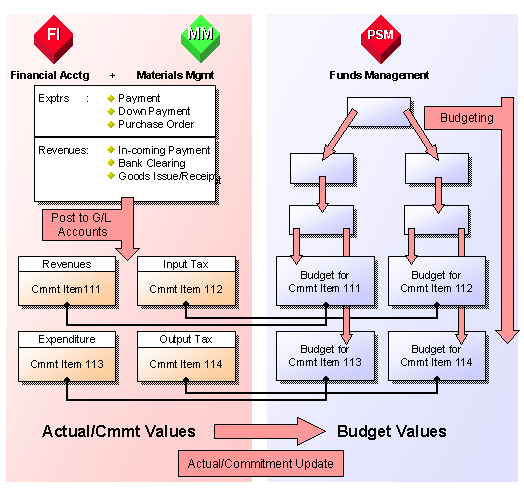
You can find examples of G/L accounts and the control parameters which must be defined in the corresponding commitment items under Example: Assigning Commitment Items to G/L Accounts .
 Note
Note
If you do not assign the commitment items to the G/L accounts and no manual entries are made, you must be able to derive the commitment items from the cost element. To do this you must define your account assignment derivation in such a way that the commitment items are derived from their assignments to cost elements. For more information on the derivation of commitment items from the cost element, see Deriving FM Account Assignment Elements from CO Account Assignments .